We wrote this so you can see how the topic works in practice. You can read it from anywhere. If you want lab practice next, we will help you pick a course in counselling.
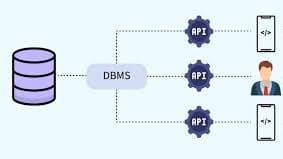
A database is an organized collection of structured information or data that can be easily accessed, managed, and updated. Databases are the backbone of modern applications, from websites and mobile apps to enterprise systems, enabling efficient data storage, retrieval, and management.
Types of Databases
Types of Databases
Databases come in different types, each designed to handle specific kinds of data and use cases. Understanding the various types helps learners and professionals choose the right database for their applications.
1. Relational Databases (RDBMS)
Relational databases store data in structured tables with rows and columns. They use SQL (Structured Query Language) for querying and managing data.
Key Features:
Data organized into tables with relationships
Ensures data integrity and consistency
Supports complex queries and transactions
Examples: MySQL, PostgreSQL, Oracle, Microsoft SQL Server
Use Cases: Banking systems, e-commerce platforms, and inventory management
2. NoSQL Databases
NoSQL databases are designed for unstructured or semi-structured data. They provide flexibility in schema design and are suitable for large-scale and high-performance applications.
Types of NoSQL Databases:
Document-based: MongoDB, CouchDB
Key-value stores: Redis, DynamoDB
Column-based: Cassandra, HBase
Graph databases: Neo4j
Use Cases: Social media platforms, real-time analytics, IoT applications
3. Cloud Databases
Cloud databases are hosted on cloud platforms, offering scalability, high availability, and remote access. They can be relational or NoSQL and are often managed by the service provider.
Key Features:
On-demand scalability
Reduced infrastructure maintenance
Easy integration with cloud services
Examples: AWS RDS, Google Cloud Firestore, Microsoft Azure SQL Database
Use Cases: SaaS applications, mobile apps, data-intensive platforms
4. In-Memory Databases
In-memory databases store data in the system’s main memory (RAM) instead of disks, enabling extremely fast data access and processing.
Examples: Redis, SAP HANA
Use Cases: Real-time analytics, caching, gaming applications, financial trading platforms
5. Object-Oriented Databases
Object-oriented databases store data as objects, similar to object-oriented programming languages. They allow for complex data representation and relationships.
Examples: db4o, ObjectDB
Use Cases: Multimedia applications, CAD/CAM systems, scientific research
6. Hierarchical and Network Databases
Hierarchical databases: Data is organized in a tree-like structure. Example: IBM IMS
Network databases: Data is organized as a graph of records with relationships. Example: Integrated Data Store (IDS)
Use Cases: Legacy enterprise systems, telecommunications, and early database systems
Database in Real Applications
Database in Real Applications
Databases are at the heart of almost every modern application, enabling efficient storage, retrieval, and management of data. Understanding how databases are applied in real-world scenarios helps learners see the practical importance of database skills.
1. E-Commerce Platforms
E-commerce websites like Amazon or Flipkart rely heavily on databases to:
Manage product catalogs and inventory
Track customer orders and payment histories
Personalize recommendations based on user behavior
Without a database, managing millions of products and users would be impossible.
2. Banking and Financial Systems
Banks use databases to:
Store account information, transactions, and loan records
Enable online banking and ATM operations
Ensure data security and integrity through transaction management
Databases ensure reliable, accurate, and secure financial operations.
3. Healthcare Systems
Healthcare organizations use databases to:
Maintain patient records and medical histories
Store test results, prescriptions, and treatment plans
Enable hospital management systems for scheduling and billing
Databases improve efficiency, patient care, and data accessibility.
4. Social Media Platforms
Social media applications like Facebook, Instagram, and Twitter use databases to:
Store user profiles, posts, comments, and likes
Track user interactions and connections
Provide real-time feeds and recommendations
Databases handle large-scale data efficiently, ensuring smooth user experiences.
5. Educational Platforms
Online learning platforms like Coursera or Khan Academy use databases to:
Manage student profiles, course content, and progress tracking
Store assessment results and certificates
Enable personalized learning recommendations
Databases allow learners and educators to interact seamlessly.
6. Logistics and Supply Chain Management
Companies like FedEx or DHL use databases to:
Track shipments, inventory, and warehouse stock
Optimize delivery routes and schedules
Monitor performance and generate reports
Databases ensure timely deliveries and efficient supply chain operations.
Who this is for
This is for students, job seekers, and working learners who want a clearer picture of the skill before they pick a course.
How we help you after you read
We help you see a career direction before you pick a course. You can start from where you are, including if you are new to IT. In lab we practise the role, not only names of tools. After a course, we stay with you until you get a job, based on your performance.
Share this article
What you can do next
If this topic is the skill you want to practise, we can map it to a course. Visit an Ahmedabad centre with your parents, or join through online admission if you live outside Ahmedabad.
Short answers about who this is for, what to do next, and how to talk to us.
Who should read What is Database and Why It Is Important?
This is for students, job seekers, and working learners who want a clearer picture of the skill before they pick a course. You can read it from anywhere. If you want lab practice next, we will help you pick a course.
Do I need to visit Ahmedabad to use this article?
No, you can read it from anywhere. If you want to learn with us next, we warmly welcome you and your parents to visit one of our Ahmedabad centres — Maninagar, Nikol, or Vatva. If you live outside Ahmedabad, you can join through online admission with a counselling call.
Is this article the same as joining a CEC course?
No. We wrote this so you can understand the topic in plain language. A course is where you practise in lab, build work, and get feedback.
What should I do after I finish reading?
If this is the skill you want to practise, book counselling or open a related course. For this topic, you can start with Data Analytics with Python & Power BI, Mobile Application Development, Job Ready Data Science & AI Engineer, or browse all courses.
Can a parent use this to decide for a child?
Yes. You can read it together and then book counselling. School children of any grade start with counselling first — we do not enrol a child into a full career track without that conversation.
Can I start this skill after 10th or 12th if I did not pass?
After 10th or 12th, anyone can apply — pass, not pass, or a gap year, and any stream. Counselling is where we match the skill in this article to a course you can actually attend.
Will reading this get me a job?
No. An article is for understanding. If you join a course, complete practical work, and sit interviews, we stay with you until you get a job, based on your performance.
How do I talk to CEC about this topic?
Book counselling and mention this article, call +91 75740 10176, WhatsApp the same number, or email info@cecyours.org. In Ahmedabad, we would be glad to welcome you and your parents at a centre; outside Ahmedabad, we will set up a counselling call.