Excel Course in Vatva, Ahmedabad
Excel earns its place when it finishes a business task — clean the export, look up the fact, build the table, chart the answer and check the total. You follow the same task-first depth we teach citywide; counseling here fits shift logs, downtime rows and stores exports common in industrial-belt desks nearby. The centre is near vatva lake garden; opposite kashiben hospital.
Counseling comes first. We warmly welcome you and your parents to visit before classroom admission.
Or reach us directly
+91 91571 90839 · info@cecyours.org
Business task preview
Clean the sheet
Fix blanks, dates and duplicates before any total.
Look up the fact
Pull the right row without copy-paste errors.
Build the table
Structured ranges managers can filter and trust.
Chart the answer
Show one decision — not ten decorative visuals.
Focus
Business tasks
For
Pros & changers
Hands-on
~80%
First step
Counseling
What Excel skills do you practise on real tasks?
Six skills — each with a concrete task you can reproduce. Practice task with us: bring one messy export to counseling.
Formulas that answer a desk question
Sum, average, IF-style logic and dynamic lookups used on real columns — not a menu tour of every function name.
Task: rebuild last month’s net total from rows after returns.
Data cleaning you can reproduce
Trim text, fix “15k” into numbers, drop duplicate keys and refuse blank demand cells that would invent a KPI.
Task: leave a before/after sheet with rules written in a note.
Lookups without silent wrong matches
XLOOKUP / INDEX-MATCH style pulls with a check when the key is missing — so you do not paste yesterday’s rate by accident.
Task: price a product list and flag every missing SKU.
Tables managers can filter
Structured tables, slicer-friendly pivots and named ranges that survive new rows next week.
Task: turn a flat export into a filterable sales table.
Charts tied to one decision
Pick the cut that changes an action. Extra sparkles that do not change the decision stay off the pack.
Task: one chart + one sentence recommendation.
Analysis and desk habits
Write the metric definition, keep a control total, and save a version you can reopen. Helpers may suggest formulas — you still verify the figure.
Task: metric card + control total on the same pack.
Excel training at Computer Education And Cybernetics (CEC) in Ahmedabad centres on formulas, cleaning, lookups, tables, charts, analysis and desk habits — practised through reproducible business tasks. Mentors who ship client reporting through Mascev Private Limited review whether your control total matches the cleaned rows — including at CEC Vatva.
Which desk habits keep Excel numbers trustworthy?
Four habits that outlast any single formula. What we do with you here: you leave with a metric card, not only a pretty chart.
Habit 1
Name the business question first
“Which shift drove the downtime spike?” beats opening Excel to “try features.” The sheet waits for a clear ask.
Habit 2
Clean before you calculate
Totals on dirty dates and blanks lie confidently. Cleaning rules belong in a note next to the file.
Habit 3
Keep a control total
Rebuild the key number a second way. If the two disagree, stop — do not chart the wrong one.
Habit 4
Hand over a pack a manager can reopen
Source sheet, cleaned table, chart and one recommendation sentence. Screenshots alone are weak evidence.
Ready for decision-oriented analytics next? See business reporting in Ahmedabad. Building a longer ladder? See data career course at Vatva.
What deeper Excel practice comes after the basics?
MIS packs, variance notes and knowing when to step up — enough to act, with counseling for the longer path.
Pivot and MIS packs
Weekly MIS that refreshes when rows arrive — with filters a manager can use without breaking formulas.
Scenario and variance checks
What-if tables and variance notes that explain a gap — not only a red cell.
When Excel is enough — and when to step up
Many Ahmedabad desk jobs stay in Excel. Counseling maps when SQL or Power BI is the next rung on a longer data path.
Practice task
Take any weekly export from your desk (or a sample). Write the business question, clean five problems, rebuild one control total and add one recommendation sentence. What we do with you here: a mentor checks that the pack reopens cleanly.
A worked example: shift export to a handover note
Ask → what you look at → what you do → what you hand over. The win is a reproducible pack — not a feature demo.
The desk ask
A production supervisor wants a shift-handover downtime summary before the morning meeting — from two shift exports with mismatched station codes, duplicate batch IDs and downtime minutes stored as text.
What you look at
Mixed timestamps, station codes that do not match QC logs, duplicate batch rows that inflate output, downtime minutes stored as text.
What you do in Excel
Align shift grain, dedupe batches, define downtime minutes, build a pareto by reason code, keep a control total that matches the cleaned log.
What you hand over
Merged shift table, downtime pareto, unmatched-station list, metric definitions and one handover note. The pack reopens next week.
A practical Excel drill at Computer Education And Cybernetics (CEC) starts with messy shift exports, aligns batch grain, defines downtime minutes, builds a reason-code pareto and ends in a handover note with a control total. Mentors from Mascev Private Limited treat chart-only packs without cleaning notes as unfinished.
Where is practical Excel skill heading?
Trustworthy packs outlast menu memorisation. What we do with you here: you practise cleaning and control totals every stage.
Button-only Excel profiles shrink
Knowing where menus sit is not enough when drafts and charts get cheaper. Clean logic and control totals stay valuable.
Desk evidence still opens doors
MIS, ops and finance hiring still asks for openable workbooks — not only tool logos on a resume.
Excel remains the first analytics rung
Many Gujarat SME desks live in spreadsheets. Strong Excel habits feed later SQL and Power BI practice without rewriting your foundations.
As drafts get cheaper, Excel value shifts to cleaning, safe lookups, control totals and openable MIS packs. At Computer Education And Cybernetics (CEC) in Ahmedabad, we train those habits with named tasks — not a feature parade.
How we take you through Excel practice
Counseling names the desk task. Lab builds the pack. Mentors who ship client reporting challenge missing control totals.
1. Counseling maps your desk tasks
We name the exports you already touch — shift logs, downtime rows, stores sheets — and place Excel practice on those tasks first, with batch timing that fits shift and office hours.
2. You practise reproducible packs in lab
About 80% of related training time is practical. You keep before/after sheets, miss lists and control totals mentors can score.
3. Mascev mentors challenge pretty-but-wrong sheets
Our 25+ full-time trainers include people who build reporting for real clients through Mascev Private Limited. They send work back if the control total is missing.
4. Path up when Excel alone is not enough
Counseling confirms whether you stay spreadsheet-strong or step into SQL and Power BI on the catalogue path. Fees and vouchers stay in counseling.
5. Stay-with-you support with honest limits
We stay with you until you get a job, based on your performance. Task packs guide interviews — not invented pay ranges or tool-title promises.
At Computer Education And Cybernetics (CEC) in Ahmedabad, Excel practice starts with counseling, then task packs with mentors from Mascev Private Limited. Fees, batch schedule, placement support and certification details: speak to a CEC counsellor for a complete walkthrough. We stay with you until you get a job, based on your performance.
Data Analytics with Python & Power BI
Catalogue path where Excel is the foundation rung — then SQL and Power BI when counseling confirms you are ready.
View catalogue coursePortfolio packs that prove Excel task skill
Two openable packs. Counseling confirms which desk scenario you practise first.
Shift log merge MIS pack
Problem: Two shift files use different station codes — yield and downtime totals double before handover.
Live demo: Align shift exports, document batch rules, rebuild output by hand and flag unmatched stations.
You ship: Before/after workbook + grain note
What you explore
- Cleaning
- Shift grain
- Control totals
Downtime pareto with minute checks
Problem: Copy-paste downtime silently adds minutes when a reason code is missing — the pareto still looks decisive.
Live demo: Clean downtime rows, build a pareto by reason and highlight every unmatched code before totals run.
You ship: Pareto sheet + miss list
What you explore
- Pivots
- Validation
- Desk habits
Interview answers that match Excel desk work
Employer-style prompts — separate from FAQs. Open the workbook while you answer.
Show me how you clean a messy shift export.
I fix types, align shift grain, drop or flag duplicate batches, write the metric definition, rebuild a control total and keep a before/after note — then I chart.
How do you stop a wrong lookup?
I look up with a clear miss path, highlight unmatched keys and refuse to total until misses are resolved or approved.
What makes an Excel pack interview-ready?
A manager can reopen the file, see the definition, filter the table and read one recommendation — not only a screenshot of a chart.
Who is this Excel course for?
Working professionals and career changers who need Excel for business and analysis tasks.
Working professionals
Ops, stores, quality and MIS roles that live in sheets — upgrade cleaning, lookups and packs supervisors and managers can trust.
Career changers
Turn “I know some Excel” into reproducible task packs that open a longer data or analytics path.
Placement support and certificates
An openable Excel pack impresses more than a resume line that only says “advanced Excel.”
How we stay with you
- We stay with you until you get a job, based on your performance in training, projects and interviews
- Our 5-step placement preparation covers resume, portfolio, communication and mock interviews
- Certificates follow the practical path counseling places you on — Excel packs feed the wider analytics catalogue when that is your next step
Visiting CEC Vatva for Excel counseling
Near Vatva Lake Garden; opposite Kashiben Hospital. Accessible from industrial belt routes. Learners also travel from Vatva, Ramol, Lambha, Isanpur, Narol. Hours: Mon – Sat: 8:00 AM – 8:15 PMSun: 10:00 AM – 6:00 PM.

Priya Shrivas
Senior Software Faculty · 3+ years
CCC · Tally Prime · Prompt Engineering
Suhani Kushwaha
Software Faculty · 2+ years
Data Analytics · Data Science · AI/ML
Full address and map: CEC Vatva location details. Compare the citywide guide: Excel course in Ahmedabad.
Our three centres in Ahmedabad
For classroom admission we warmly welcome you and your parents to visit — Vatva is listed first for learners aiming at this centre. Please choose whichever centre is easier for you. Learning from outside Ahmedabad? We are happy to guide you on a counseling call and complete your admission online.
CEC VatvaThis centre
Near Vatva Lake Garden; opposite Kashiben Hospital
1st Floor, Computer Education And Cybernetics, Opposite Kashiben Hospital Beside Khodiayar Vav, Near Vatva Lake Garden, Vinzol Crossing Rd, Deriya Para, Vatva, Ahmedabad, Gujarat 382440+91 91571 90839CEC Maninagar
~2 minutes from Maninagar Railway Station
2nd floor, Gopal Tower, Computer Education And Cybernetics, near Maninagar Railway Station Road, Maninagar, Ahmedabad, Gujarat 380008+91 75740 10176CEC Nikol
Near / opposite New DMart, Nikol (Satyam Plaza)
S -25/26, D-mart, Satyam Plaza, Raspan Cross Rd, opp. Suketu Residency, near Nikol, Ankur Chokadi, New India Colony, Nikol, Ahmedabad, Gujarat 382350+91 91049 37871
Google reviews from CEC Vatva
Real Google reviews from learners at this centre. We show approved quotes with the reviewer’s photo — we do not invent testimonials.
4.9
91 Google reviewsas of 14 Nov 2026
Akashkumar Kushawaha
CEC Vatva“One of the best IT training institutes in Vatva! CEC - Computer Education And Cybernetics provides excellent training in various IT courses. The faculty is knowledgeable, supportive, and always ready to help. The course content is practical and industry-relevant, which makes it easy to understand and apply. Whether you're a beginner or looking to upgrade your skills, CEC is the perfect place to start your IT career. Highly recommended for anyone serious about learning and growing in the IT field!”
a year agoGoogleJigar Prajapati
CEC Vatva“Best education experience in Python Course, I learnt a lot from here. Thanks for the CEC and Gopalsir”
4 years agoGoogleNick Mujpara
CEC Vatva“At Computer Education and Cybernetics, we strive for excellence – thanks for noticing!”
4 years agoGoogle


Related guides
- Excel course in AhmedabadCitywide Excel task guide
- Excel for data analysis in AhmedabadAnalysis-oriented spreadsheet work
- Business reporting course in AhmedabadRepeatable MIS and reporting packs
- Excel automation course in AhmedabadWhen macros and refresh habits matter
- Data career course at VatvaLonger ladder after Excel foundation
- Business analytics course at VatvaNext rung when Excel packs need a full decide loop
- Excel course at ManinagarSibling locality — retail MIS angle
- Excel course at NikolSibling locality — distribution desk angle
- Data Analytics with Python & Power BICatalogue path Excel sits inside
- Book a counseling sessionMap Excel tasks to your desk or next path
Questions about Excel practice
What will I learn in an Excel course at CEC?
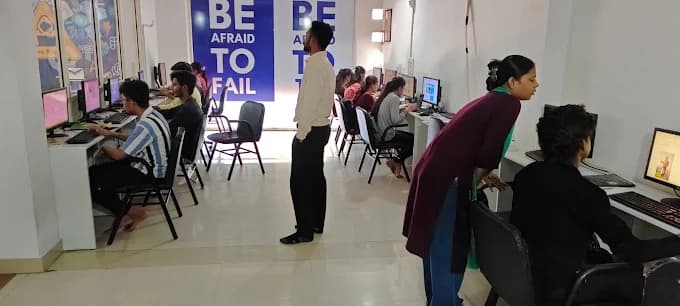
Practical business and analysis tasks: formulas, data cleaning, lookups, tables, charts, analysis and desk habits you can reproduce. At Computer Education And Cybernetics (CEC) in Ahmedabad, we frame Excel around real desk packs — not a feature list.
Is this a beginner Excel course?
Counseling places you by current comfort. Working professionals and career changers often start with cleaning and lookups on messy exports; foundations are added when needed. School learners of any grade start with counseling first.
How is this different from watching Excel tutorials?
Tutorials show buttons. We practise tasks with control totals, miss flags and a pack a manager can reopen. That evidence is what desk roles and later analytics paths need.
Do you teach only menus and shortcuts?
No. Shortcuts help, but the centre is cleaning, lookups, tables, charts and habits that keep numbers honest when new rows arrive.
Where does AI fit in Excel practice?
Lightly. Helpers may suggest formulas or cleaning steps. You still verify the figure with a control total — AI made drafts cheap; checking stayed valuable.
Where is Excel skill demand heading?
Button-only profiles shrink. Demand stays for people who clean data, look up facts safely, keep control totals and hand over openable packs — especially across Gujarat SME desks.
How does CEC help on this Excel path?
We start with counseling, practise task packs in lab, and review your control totals. About 80% of related training time is practical. Mentors include trainers who build client reporting through Mascev Private Limited. We stay with you until you get a job, based on your performance.
What portfolio pieces will I have?
Task packs such as a shift log merge MIS clean-up and a downtime pareto with miss flags — evidence you can reopen, not only screenshots.
How is this centre's Excel practice different from the citywide guide?
Same task-first curriculum. Counseling here plans batches around shift-friendly hours and production-style exports common near the industrial belt. The city guide stays the overview.
How do I reach the Vatva centre?
CEC Vatva is Near Vatva Lake Garden; opposite Kashiben Hospital. Accessible from industrial belt routes. Learners also travel from Vatva, Ramol, Lambha, Isanpur, Narol. Hours: Mon – Sat: 8:00 AM – 8:15 PM,Sun: 10:00 AM – 6:00 PM. Call +91 91571 90839 before you visit.
Do I need to visit before classroom admission?
We warmly welcome you and your parents to visit for counseling and admission — meet mentors, see the lab and ask questions face to face. Learning from outside Ahmedabad? We are happy to guide you on a counseling call and complete your admission online.
Is Excel enough for a data career?
Excel is often the first rung. Many desk roles stay spreadsheet-first. When you need SQL or Power BI next, counseling maps the longer path through our Data Analytics with Python & Power BI catalogue course.
Bring one messy export — we map the Excel tasks
Tell us what repeats on your desk. At CEC Vatva we practise cleaning, lookups, tables and charts with control totals — not a feature tour.