Excel Automation Course in Maninagar, Ahmedabad
If you rebuild the same spreadsheet every week, Excel automation is the craft of shaping the work once — Tables, formulas, Power Query-style transforms and a refresh you verify before you trust it. You follow the same automation path we teach citywide; counseling here fits store Monday packs and POS-style exports common in the commercial catchment nearby. The centre is ~2 minutes from maninagar railway station.
Counseling comes first. We warmly welcome you and your parents to visit before classroom admission.
Or reach us directly
+91 75740 10176 · info@cecyours.org
Automation stations
Shape once
Power Query-style steps that clean the same export every week.
Reuse the logic
Tables and formulas that expand when new rows arrive.
Refresh the pack
One click — or a schedule — after the control total passes.
Verify first
Automation without a check only scales mistakes faster.
Focus
Repeatable packs
For
Pros & changers
Hands-on
~80%
First step
Counseling
What does Excel automation mean for repetitive sheet work?
Excel automation is making a pack repeatable: clean and shape once, keep formulas that expand, refresh with a control total and only then schedule. What we do with you here: bring the sheet you rebuild every week to counseling.
Formulas that survive new rows
Structured references and spill-friendly formulas so next week’s export does not force you to drag-fill again.
Practice: convert a flat range to a Table and rebuild one total that auto-expands.
Structured tables as the automation base
Named tables keep pivots, charts and lookups pointed at growing data — the foundation before any schedule.
Practice: one Table + one pivot that refreshes when you paste new rows.
Power Query-style transforms you can re-run
Unpivot, merge, type columns and append monthly files once — then refresh instead of retyping Monday’s clean-up.
Practice: shape two weekly files and write the refresh steps a teammate can follow.
Reusable logic with a written rule
IF-style flags, lookup miss paths and metric definitions stored next to the pack — so the next person (or you next month) does not guess.
Practice: miss-flag column + three-line rule card beside the sheet.
Appropriate automation — not every macro
Refresh, scheduled delivery or a simple one-click pack when the metric is stable. We do not automate a broken total.
Practice: choose refresh-only vs schedule for a lab Monday pack and say why.
Human check before go-live
Control total, sample-row spot check and a short runbook for “if refresh fails.” Helpers may draft steps — you still verify.
Practice: verify note with one catch case before you trust the refresh.
Excel automation at Computer Education And Cybernetics (CEC) in Ahmedabad means formulas, structured tables, Power Query-style transforms, reusable logic and verified refresh packs that cut repetitive spreadsheet work. Mentors who ship client reporting through Mascev Private Limited refuse to treat an unverified schedule as unfinished — including at CEC Maninagar.
A worked example: store Monday MIS from copy-paste to refresh
Pain → what you look at → what you automate → what you hand over. The win is a pack that refreshes after verification — not a macro demo.
The repeating pain
Every Monday a store ops lead rebuilds the same retail MIS: paste POS and returns dumps, fix text SKUs by hand, rebuild net sales and email a screenshot to the owner.
What you look at
Column order changes after a promo weekend, text dates, returns split across sheets and a helper-suggested formula that treats returns as positive sales.
What you automate in Excel
Shape and append once in Power Query, load to a Table, keep spill/structured formulas for net and stockout flags, build the KPI sheet, run a control total, then refresh — schedule only after the verify note passes.
What you hand over
Refreshable pack, verify note (including the rejected AI formula), and a three-line runbook: “if refresh fails, check the POS export folder → re-type dates → re-run control total.”
Practice task
Pick one sheet you rebuild weekly. List the five manual steps, shape the clean-up once, load to a Table, write a control total and a three-line runbook. What we do with you here: a mentor checks that refresh still matches source before any schedule talk.
An Excel automation drill at Computer Education And Cybernetics (CEC) turns a Monday copy-paste MIS into a Power Query + Table pack with a control total, a rejected AI formula in the verify note and a short failure runbook. That is automation practice — not a feature parade.
Where is Excel automation skill heading?
Draft steps get cheaper; trustworthy refresh packs stay scarce. What we do with you here: you practise verification before every go-live — including when a helper drafts the transform.
Draft automation steps get cheaper
Helpers propose Power Query steps and formulas quickly. Value shifts to people who refuse to schedule a pack until the control total matches source.
Repeatable packs beat hero macros
Hiring still asks for workbooks that refresh next month. A brittle macro that only the author understands is weak evidence.
Verification stays the durable skill
Spreadsheet automation connects to wider business automation — but Excel still needs a human who owns the metric. Production got cheap; checking stayed hard.
As automation drafts get cheaper, Excel automation value shifts to shape-once packs, control totals and runbooks. At Computer Education And Cybernetics (CEC) in Ahmedabad, we train those habits and connect them honestly to wider business automation when counseling says you are ready.
Need foundations first? See Excel course at Maninagar. Ready for deeper MIS design? See advanced Excel at Maninagar. Analysis-first next? See Excel for data analysis at Maninagar.
How we take you through Excel automation practice
Counseling names the repeating pack. Lab builds the refresh. Mentors who ship client reporting block schedules that skip verification.
1. Counseling names the pack you rebuild
We ask which retail or ops sheet eats your Monday — MIS, pricing, stock — and place automation practice on that repeating pain first.
2. You build refreshable packs in lab
About 80% of related training time is practical. You leave Power Query steps, Tables, verify notes and runbooks mentors can score.
3. Mascev mentors block unverified schedules
Our 25+ full-time trainers include people who build reporting for real clients through Mascev Private Limited. They send work back if you schedule before the control total passes.
4. Bridge to wider automation when ready
Counseling maps when Excel refresh is enough and when AI or business automation paths fit next. Fees and vouchers stay in counseling.
5. Stay-with-you support with honest limits
We stay with you until you get a job, based on your performance. Refreshable packs guide interviews — not invented pay ranges.
At Computer Education And Cybernetics (CEC) in Ahmedabad, Excel automation practice starts with counseling, then shape-once refresh packs with mentors from Mascev Private Limited. Fees, batch schedule, placement support and certification details: speak to a CEC counsellor for a complete walkthrough. We stay with you until you get a job, based on your performance.
Data Analytics with Python & Power BI
Catalogue path where Excel automation supports MIS and reporting roles — then SQL and Power BI when counseling confirms you are ready. Certification anchors such as Microsoft PL-300 sit on the wider path; vouchers stay in counseling.
View catalogue coursePortfolio packs that prove Excel automation skill
Two openable packs scoped to reducing repetitive sheet work. Counseling confirms which Monday pain you automate first; Excel for data analysis covers the analysis-first angle when that is your next step.
Store Monday pack that refreshes — after you verify
Problem: Someone rebuilds the same retail MIS by hand every week. Automating without a control total only scales the mistake.
Live demo: Shape lab POS-style weekly exports, build KPIs on a Table, pass a human check, then show one-click refresh with a failure runbook.
You ship: Refreshable pack + verify note + runbook
What you explore
- Power Query
- Tables
- Refresh habits
SKU price lookup pack that expands
Problem: Copy-paste promo pricing breaks when new SKUs arrive and silent wrong matches slip into totals.
Live demo: Build a Table-based price lookup with miss flags, paste a new week of rows and prove the logic still catches blanks.
You ship: Reusable lookup sheet + miss list
What you explore
- Structured formulas
- Reusable logic
- Verification
Interview answers that match repeatable Excel packs
Employer-style prompts — separate from FAQs. Open the workbook while you answer.
Walk me through an Excel pack you would trust to refresh next month.
I show the Power Query steps, the Table, the control total, the verify note and the runbook — including what I rejected from an AI-drafted formula.
What do you check before you schedule an automated refresh?
Source folder, control total against raw export, one miss-flag spot check and a three-line failure runbook — never go live on a failing total.
When would you move beyond Excel automation?
When the metric is stable in Excel but the business needs cross-tool automation. I still ship the verified Excel pack first as evidence.
Who is this Excel automation course for?
Working professionals and career changers who want less copy-paste and more refreshable packs they can defend.
Working professionals
Ops, finance, sales support and MIS roles that rebuild the same sheet every week — cut copy-paste with refreshable packs you can defend.
Career changers
Show Reporting Analyst / MIS evidence: not “I know Excel,” but a Monday pack that refreshes with a verify note.
Placement support and certificates
A refreshable Monday pack with a runbook impresses more than a resume line that only says “macros.”
How we stay with you
- We stay with you until you get a job, based on your performance in training, projects and interviews
- Our 5-step placement preparation covers resume, portfolio, communication and mock interviews
- CEC examination certificates follow the practical path counseling places you on; global anchors such as Microsoft PL-300 sit on the wider analytics path — vouchers stay in counseling
Visiting CEC Maninagar for Excel automation counseling
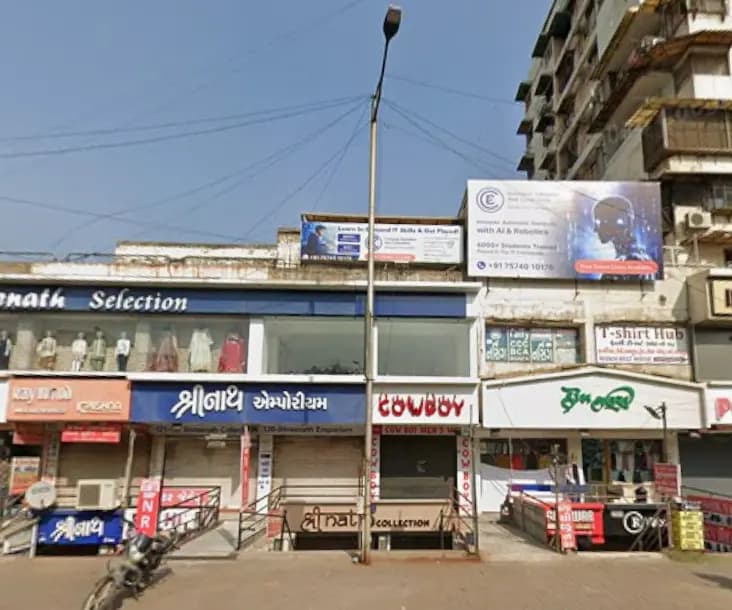
~2 minutes from Maninagar Railway Station. BRTS, AMTS. Learners also travel from Kankaria, Isanpur, Ghodasar, Khokhra, Meghaninagar, Danilimda. Hours: Mon – Sat: 8:45 AM – 7:15 PMSun: 10:00 AM – 6:00 PM.
Nayan Nathani
Software Faculty · 2+ years
Data Analytics · Cyber Security
Full address and map: CEC Maninagar location details. Compare the citywide guide: Excel automation course in Ahmedabad.
Our three centres in Ahmedabad
For classroom admission we warmly welcome you and your parents to visit — Maninagar is listed first for learners aiming at this centre. Please choose whichever centre is easier for you. Learning from outside Ahmedabad? We are happy to guide you on a counseling call and complete your admission online.
CEC ManinagarThis centre
~2 minutes from Maninagar Railway Station
2nd floor, Gopal Tower, Computer Education And Cybernetics, near Maninagar Railway Station Road, Maninagar, Ahmedabad, Gujarat 380008+91 75740 10176CEC Nikol
Near / opposite New DMart, Nikol (Satyam Plaza)
S -25/26, D-mart, Satyam Plaza, Raspan Cross Rd, opp. Suketu Residency, near Nikol, Ankur Chokadi, New India Colony, Nikol, Ahmedabad, Gujarat 382350+91 91049 37871CEC Vatva
Near Vatva Lake Garden; opposite Kashiben Hospital
1st Floor, Computer Education And Cybernetics, Opposite Kashiben Hospital Beside Khodiayar Vav, Near Vatva Lake Garden, Vinzol Crossing Rd, Deriya Para, Vatva, Ahmedabad, Gujarat 382440+91 91571 90839
Google reviews from CEC Maninagar
Real Google reviews from learners at this centre. We show approved quotes with the reviewer’s photo — we do not invent testimonials.
4.9
90 Google reviewsas of 14 Nov 2026
Pratham Rai
CEC Maninagar“I joined this institute for the Data Analytics course and so far my experience has been good. The teachers explain things properly and in a simple way, which makes it easier to understand as a beginner.”
a month agoGoogleRaju Yadav
CEC Maninagar“I am completed my data analytics course from this institute. I got experiencing teachers here . His teaching skills is very good .”
a year agoGoogleRathodKaushal
CEC Maninagar“They have so many career options!! Im currently pursuing data analytics from cec and i can see my future so bright!!”
a month agoGoogle


Related guides
- Excel automation course in AhmedabadCitywide automation-first guide
- Excel course in AhmedabadDesk foundations if you still need basics
- AI automation course in AhmedabadBroader AI automation beyond spreadsheets
- Business automation with AIBusiness-wide automation intent
- Excel course at ManinagarFundamentals path at this centre
- Advanced Excel course at ManinagarPower Query depth and MIS design next
- Excel for data analysis at ManinagarAnalysis-first import → interpretation path
- Data Analytics with Python & Power BICatalogue path Excel automation sits inside
- Book a counseling sessionMap which Monday pack to automate first
Questions about Excel automation
What is Excel automation training at CEC?
Excel automation at Computer Education And Cybernetics (CEC) in Ahmedabad means making spreadsheet work repeatable: formulas and tables that expand, Power Query-style transforms you can refresh, reusable logic and appropriate scheduling — always with a verify step before go-live.
How does Excel automation work in practice?
You shape the clean-up once, load results to a Table, keep formulas that survive new rows, refresh the pack and only then consider a schedule. Mentors check the control total before they trust any refresh.
Do I need macros for Excel automation?
Not always. Many Monday packs become repeatable with Power Query, Tables and solid formulas. We teach appropriate automation — macros or schedules when the metric is stable, not as the first move.
Where does AI fit in Excel automation?
Helpers may draft formulas or transform steps. You still verify against source before you schedule — AI made production cheap; verification stayed valuable. Automating a wrong draft only scales the error.
Where is spreadsheet automation heading?
Draft steps get cheaper. Demand stays for people who build refreshable packs with runbooks and refuse to go live on a failing control total — the same habit that connects Excel work to wider business automation.
How does CEC help you on this Excel automation path?
We start with counseling to name the pack you rebuild every week, then practise shape-once refresh habits in lab. About 80% of related training time is practical. Mentors include trainers who build client reporting through Mascev Private Limited. We stay with you until you get a job, based on your performance.
Who is this Excel automation course for?
Working professionals and career changers who lose hours to repetitive spreadsheet work. After 10th or 12th anyone can apply. School learners of any grade start with counseling first.
What portfolio pieces will I leave with?
Openable packs such as a store Monday refreshable MIS with a verify note and runbook, and a Table-based SKU price lookup with miss flags that expands when rows arrive. Counseling confirms which desk scenario you ship first.
How is this different from advanced Excel or AI automation?
Advanced Excel goes deeper on analysis and MIS design. AI automation and business automation cover broader tools beyond spreadsheets. This path stays on Excel — reducing repetitive sheet work with verified refresh packs. Fees and vouchers stay in counseling.
How do I reach the Maninagar centre?
CEC Maninagar is ~2 minutes from Maninagar Railway Station. BRTS, AMTS. Learners also travel from Kankaria, Isanpur, Ghodasar, Khokhra, Meghaninagar, Danilimda. Hours: Mon – Sat: 8:45 AM – 7:15 PM,Sun: 10:00 AM – 6:00 PM. Call +91 75740 10176 before you visit.
Do I need to visit before classroom admission?
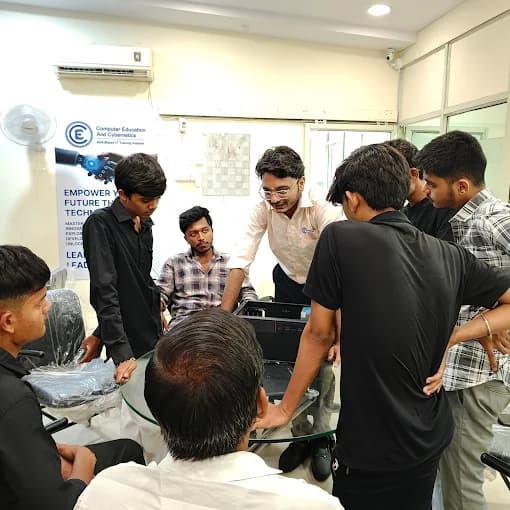
We warmly welcome you and your parents to visit for counseling and admission — meet mentors, see the lab and ask questions face to face. Learning from outside Ahmedabad? We are happy to guide you on a counseling call and complete your admission online.
How is this centre's automation practice different from the citywide guide?
Same shape-once refresh curriculum. Counseling here fits retail Monday packs and POS-style exports common in the commercial catchment nearby. The city guide stays the overview.
Bring the sheet you rebuild every week
Tell us what repeats on Monday. At CEC Maninagar we practise shape-once transforms, Tables and verified refresh packs — so automation cuts copy-paste without scaling mistakes.