Networking Course in Vatva, Ahmedabad

Networking here means a floor you can trace: two labeled cables on one switch, a router as the gateway, and a Wi-Fi phone whose address matches that LAN. After 12th, in college, or changing careers — including if you already help with machines at work — you practise that with us. At Computer Education And Cybernetics (CEC) a mentor checks the phone’s address before the note counts. The bench is near the lake garden, opposite Kashiben Hospital.

Or reach us directly

+91 91571 90839 · info@cecyours.org

One floor card for the LAN

  • Workshop PC172.16.50.10
  • Front desk172.16.50.20
  • Router172.16.50.1
  • Phone should show172.16.50.30
You label
Both cable ends
Wi-Fi is done
When the phone matches
You leave with
The floor card
You start with
Counseling

How does a workshop LAN include a Wi-Fi phone?

You cable the PCs, you give them one gateway, and you make the phone land on that same network. We put the switch and the access point in front of you before the card is typed.

A LAN on this floor means labeled cables into one switch, a router at 172.16.50.1, and PCs at 172.16.50.10 and 172.16.50.20. Wi-Fi configuration means an access point on that switch whose phone shows an address in 172.16.50.0/24, not 192.168.0. Troubleshooting means you read the link light first and the phone’s address second. Computer Education And Cybernetics (CEC) teaches this on lab gear.

  • A labeled cable is the LAN

    You run one cable from the workshop PC to the switch and another from the front desk. Each end gets the same word. If the workshop link stays dark, you follow the label before you change an address.

  • The router is the gateway for that floor

    The LAN is 172.16.50.0/24. You type 172.16.50.1 on the workshop PC and the front desk. A /24 has 256 addresses and 254 usable hosts. You are not cutting this floor into smaller rooms.

  • Wi-Fi has to join the LAN you just cabled

    You name the lab network and connect the access point to the switch. A phone that only says “connected” is not finished. Its address has to sit on 172.16.50.0, the same LAN as the workshop PC.

  • Troubleshooting reads the address, not the icon

    A phone on 192.168.0 is still inside the access point’s own range. It can look joined and still miss 172.16.50.10. You fix the access point so the phone lands on the floor LAN, then you try the workshop PC again.

A task on paper first

For 172.16.50.0/24, write the network, the router 172.16.50.1, the workshop PC 172.16.50.10, the front desk 172.16.50.20, and the broadcast 172.16.50.255. Across our centres we have conducted 20,000+ of training. This floor card is that page, done before the access point is powered.
A worked example: the phone said connected and missed the workshop PC

The icon is not the address. The address is not the cable.

  1. The plan

    The floor card lists workshop 172.16.50.10, front desk 172.16.50.20, router 172.16.50.1, and a phone that should show 172.16.50.30. Both cable ends are labeled before anything is plugged in.

  2. What you look at

    The front desk link is on. The workshop link is dark. The cable marked “workshop” at the PC has a bare end on the floor. It never reached the switch.

  3. The decision

    You seat that end in the switch port you labeled. The workshop PC answers a ping from the front desk. A phone then joins the lab Wi-Fi and shows 192.168.0.20. The icon says connected. The address is a different network.

  4. What you write

    The cable was the first miss. The phone’s address was the second. You put the access point on 172.16.50.0, the phone shows 172.16.50.30, and it reaches the workshop PC. The card records both.

An honest limit: this floor is one switch, one router, and one access point on a single LAN. Splitting a building into rooms, and the VLANs that keep those rooms apart, is the Ahmedabad networking page. Rules between networks come after, on the network security course.

Where is everyday Wi-Fi heading?

Two changes are already on ordinary floors. You still compare the phone’s address with the LAN you cabled. A drafted note can say the phone is on the workshop LAN when the address still starts with 192.168.0.

  • People set Wi-Fi from a phone app

    The access point’s own page is disappearing behind an app that says “connected.” You still open the phone’s address. A green tick can hide 192.168.0 when the floor is 172.16.50.

  • The uplink cable is easier to forget

    Mesh nodes and ceiling radios still need a path back to the switch. A radio with no uplink leaves the phone joined and the workshop PC unreachable.

Everyday Wi-Fi is shifting as setup moves into a phone app and as radios hide the uplink. The durable skill is reading the address the phone actually has, and knowing which cable returns that radio to the switch. CEC trains that check on the floor.

How we teach you this floor

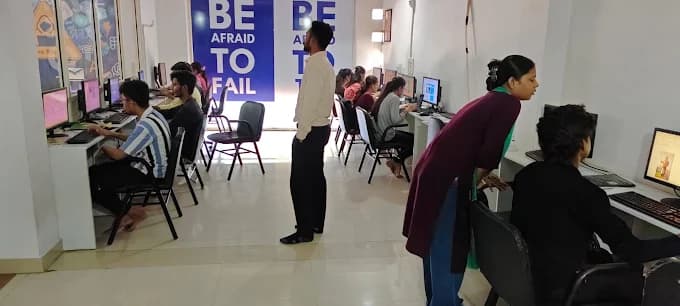
About 80% of our training is practical. A mentor reads the card the way a reviewer would: Is the labeled cable seated, and does the phone’s address match the workshop LAN?

  1. 1. Counseling before the first label

    After 12th anyone can apply, from any stream. College students, career changers, and technicians who already help with machines at work start here too. School learners of any grade start with counseling before a course.

  2. 2. A mentor checks the phone against the card

    Counseling assigns that mentor. You stay on one floor: two labeled cables, one router, and one phone. The card comes back if the phone’s address is not on 172.16.50.0.

  3. 3. Cable first, then the address

    You do not rename the Wi-Fi while a link light is off. About 80% of training time is practical. This hour is the label, the seat, and the phone’s address.

  4. 4. You leave with both misses written down

    The card names the loose cable and the 192.168.0 address. That note is what you can show. “The phone said connected” is not the whole story.

Computer Education And Cybernetics (CEC) teaches this floor as LAN setup and Wi-Fi troubleshooting: labeled cables, one gateway, and a phone address you can read. You start with counseling. We stay with you until you get a job, based on your performance. Larger subnet plans stay on the Ahmedabad networking page.

When you can tell a joined phone from a reached PC, security work has a network you understand. That next step at this centre is the cyber security course at this centre.

Placement support and certificates

The floor card is the proof you can show. We help you put it in a portfolio, then we stay with you for the job search.

How we stay with you

  • We stay with you until you get a job, based on your performance in training, projects, and interviews
  • Our 5-step placement preparation covers your resume, the floor card, communication, and mock interviews
  • The floor card, with the loose cable and the wrong phone address written on it, is what you can show
  • Course completion certificates are issued after you finish the practical requirements

More detail on placement support at CEC.

What the cable, the router, and the phone each ask of you

These are three jobs on the same floor, not three courses. After 12th you can start from the label. College students use the card when a diagram was not enough. Career changers and technicians use the phone’s address to show they can explain a connection that only looked finished.

  • The cable

    You label both ends and you trust the link light. Industrial cabling on this bench is that trace, from the workshop PC to one switch port.

  • The router

    You type 172.16.50.1 as the gateway on the PCs that share the floor. Router configuration here is that address, checked with a ping between the workshop and the front desk.

  • The phone

    You read the address after the Wi-Fi icon turns on. Wi-Fi configuration is done when the phone is on 172.16.50.0 and can reach the workshop PC.

How you reach the Vatva lab

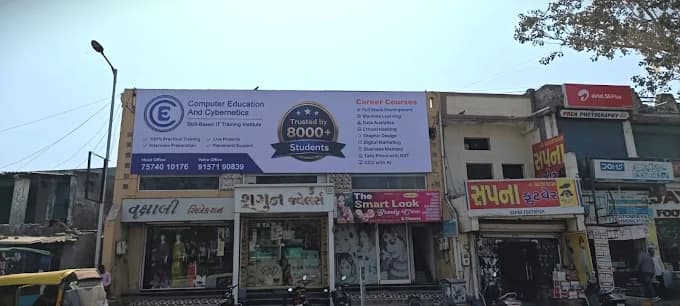
CEC Vatva is Near Vatva Lake Garden; opposite Kashiben Hospital. Accessible from industrial belt routes. Visiting is optional — counseling by phone comes first.

From the lake garden side

1st Floor, Computer Education And Cybernetics, Opposite Kashiben Hospital Beside Khodiayar Vav, Near Vatva Lake Garden, Vinzol Crossing Rd, Deriya Para, Vatva, Ahmedabad, Gujarat 382440. Call +91 91571 90839 before you travel so we can confirm the day.

  • Mon – Sat: 8:00 AM – 8:15 PM
  • Sun: 10:00 AM – 6:00 PM
  • CEC Vatva opposite Kashiben Hospital near Vatva Lake Garden
  • CEC Vatva computer lab

Faculty at this centre

Counseling assigns the networking floor. The people below teach other subjects here. This floor card is not added to those subject lists.

  • Pranav Suthar

    Senior Software Faculty · 4+ years

    Digital Marketing, Graphic Design, Full Stack Development

  • Priya Shrivas

    Senior Software Faculty · 3+ years

    CCC, Tally Prime, Prompt Engineering

  • Suhani Kushwaha

    Software Faculty · 2+ years

    Data Analytics, Data Science, AI/ML

Our three centres in Ahmedabad

This floor is at Vatva. Maninagar and Nikol are available when counseling places you there. Visiting any centre is optional.

Questions before the first label

If you can use a phone and have never labeled a network cable, bring that to counseling.

  • How does a workshop LAN include Wi-Fi?

    You label cables from the workshop PC and the front desk into one switch, set the router as 172.16.50.1, and connect an access point to that same switch. The phone must receive an address on 172.16.50.0/24, such as 172.16.50.30, and then reach 172.16.50.10. At Computer Education And Cybernetics (CEC) a mentor checks that floor card with you. A /24 has 256 addresses and 254 usable hosts.

  • What does labeling a cable change?

    You can find the loose end. If the workshop link is dark, you follow the word “workshop” from the PC to the switch instead of guessing which cable belongs where. The link light is the proof the seat worked.

  • What do you configure on the router?

    You use 172.16.50.1 as the gateway for this one LAN. The workshop PC and the front desk both use it. You prove the floor with a ping between 172.16.50.10 and 172.16.50.20. Splitting the building into smaller rooms is a later page.

  • Why can a phone say connected and still miss the workshop PC?

    The Wi-Fi icon only means the phone joined a name. If the address is 192.168.0.20, the phone is still on the access point’s own range, not on 172.16.50.0. You move the access point onto the floor LAN. Then the phone shows 172.16.50.30 and can reach the workshop PC.

  • Do I need to have worked as a technician?

    No. Counseling starts from a label and a link light if those are new. After 12th anyone can apply, from any stream. College students, career changers, and technicians who already help with machines use the same floor card.

  • Where is this kind of Wi-Fi heading?

    Many access points are now set from a phone app, and the uplink back to the switch is easier to skip. A drafted note can say the phone is on the workshop LAN when the address still starts with 192.168.0. The check that stays is the address on the phone, compared with the LAN you cabled.

  • How does CEC help me practise this floor?

    Counseling assigns a mentor for the floor card. You label two cables, seat the loose end, and correct a phone that joined Wi-Fi on 192.168.0. About 80% of training time is practical. Larger subnet plans stay on our Ahmedabad networking page.

  • Can I start after 12th, from college, or while changing careers?

    Yes. After 12th anyone can apply, from any stream. College students and career changers use the same bench. Technicians who want a written way to troubleshoot a “connected” phone start here too. School learners of any grade start with counseling before a course.

  • How do I reach the Vatva lab?

    CEC Vatva is Near Vatva Lake Garden; opposite Kashiben Hospital. Accessible from industrial belt routes. Learners also come from Vatva, Ramol, Lambha, Isanpur, Narol. The centre is at 1st Floor, Computer Education And Cybernetics, Opposite Kashiben Hospital Beside Khodiayar Vav, Near Vatva Lake Garden, Vinzol Crossing Rd, Deriya Para, Vatva, Ahmedabad, Gujarat 382440. Call +91 91571 90839 before you visit.

  • Can I start without visiting Vatva?

    Yes. Counseling is by call, WhatsApp, or email on +91 91571 90839 or info@cecyours.org. Visiting the lab is optional. If another Ahmedabad centre is easier, say so in counseling and we will place you where the same floor fits.

Label the cable, then read the phone

Tell us whether you are after 12th, in college, changing careers, or already helping with machines. We will start you on the label or on what a gateway is — and the floor stays on gear we own.

Or reach us directly

+91 91571 90839 · info@cecyours.org