Network Security Course in Nikol, Ahmedabad

Network defense here means one alert you can trust, then a page you turn off. The lab server keeps its folder share. A status page you did not mean to leave on is what the alert names. In college, changing careers, or already working in IT, you practise that with us. At Computer Education And Cybernetics (CEC) Nishant Yadav checks the alert before the note counts. The lab is at Satyam Plaza, opposite New DMart.

Or reach us directly

+91 91049 37871 · info@cecyours.org

One alert for this server

  • Server10.10.20.10
  • Alert onThe status page
  • Stay quiet onThe folder share
  • Then youTurn the page off
You write
One alert
You check
The folder stays quiet
You leave with
The alert card
You start with
Counseling

How does one alert defend a server you already brought up?

You name the status page, you prove the folder stays quiet, and you turn the extra page off. We put that server in front of you before the alert is written.

Server network defense on this bench means lab server 10.10.20.10 keeps the folder share you intended. Intrusion detection is one written alert: a lab PC opened the status page. Intrusion prevention waits until that alert stays quiet on the folder. Hardening is turning the status page off, then a firewall line that allows the folder and denies the page. Computer Education And Cybernetics (CEC) teaches this on lab gear, with Nishant Yadav checking the card.

  • The server you meant to share is still the server

    10.10.20.10 is up, and the folder share is the service you intended. Server defense starts by naming that service. Anything else answering on the same machine is extra.

  • One alert names the status page

    Intrusion detection here is a written rule: a lab PC opened the status page on 10.10.20.10. You record the source, the server, and the page. You do not record the folder share in that rule.

  • A block before the check can stop the folder

    Intrusion prevention means the same rule also blocks. You do not turn that block on until an open folder stays quiet and an open status page alerts. A block that catches the folder is the wrong rule.

  • Hardening is turning the extra page off

    After the alert is right, you stop the status page. A firewall line then allows the folder and denies that page, so a restart of the page still fails at the edge. The folder keeps opening.

A task on paper first

Write the alert in one sentence: who opened the status page, on 10.10.20.10, and that the folder must stay quiet. Across our centres we have conducted 20,000+ of training. This card is that sentence, done before you block anything.
A worked example: the folder raised an alert

Normal work on the share is not an intrusion. The status page is the extra service.

  1. The plan

    The card says: alert when a lab PC opens the status page on 10.10.20.10. The folder share must not alert. After the alert is proven, the status page is turned off.

  2. What you look at

    You open the folder, which is normal work, and an alert fires. A drafted rule had named the whole server, so the folder and the status page looked the same.

  3. The decision

    You narrow the rule to the status page. The folder opens with no alert. The status page opens and the alert fires. Then you turn the status page off and deny it at the firewall. The folder still opens.

  4. What you write

    The rule, the false alert on the folder, and the page you stopped. Detection without that last line is only a note. Defense is the page staying off.

An honest limit: this bench is one server, one alert, and one page you turn off. Guest and staff rules, and the detection tools those rules use, stay on the Ahmedabad network security page. If the server is not up yet, start with the networking course at this centre.

Where is server defense heading?

Two changes are already on ordinary servers. You still separate the status page from the folder before you block. A drafted alert can treat the folder share as the intrusion, so you open the folder yourself and read what fired.

  • New servers arrive with a status page already on

    Images and appliances often answer a status page before anyone asks for a folder. The first check is still: which page did you mean to leave up?

  • Alert text is often drafted for you

    A draft can name the whole server, so the folder share alerts as if it were an intrusion. You compare the draft with one folder open and one status page open before you block anything.

Server defense is shifting as machines arrive with a status page already on, and as alert text arrives already drafted. The durable skill is an alert that names only the extra page, and a folder that still opens after you harden. CEC trains that pair on the lab server.

How we teach you this server

About 80% of our training is practical. Nishant Yadav reads the card the way a reviewer would: Did the status page alert, did the folder stay quiet, and is the page off now?

  1. 1. Counseling before the first alert

    College students, career changers, and people already working in IT start here when they can point at a server that is up. School learners of any grade start with counseling before a course. After 12th anyone can apply, from any stream.

  2. 2. Nishant Yadav reads the alert and the page you stopped

    He teaches server administration and cyber security here. He sends the card back when the folder raises an alert, or when the status page is still on after you said you hardened the server.

  3. 3. You reject a draft that names the whole server

    You may ask for a first draft of the alert. If it fires when you open the folder, you narrow it to the status page and you test both again. About 80% of training time is practical.

  4. 4. You leave with the page off

    The card shows the rule, the quiet folder, and the status page that no longer answers. An alert with the page still open is not the finished note.

Computer Education And Cybernetics (CEC) teaches this server as detection, a firewall line, and hardening: one alert, a quiet folder, and a status page turned off. You start with counseling. We stay with you until you get a job, based on your performance. Wider policy and alert tools stay on the Ahmedabad network security page.

When the page is off and the folder still opens, a wider security path has a host you can explain. That next step at this centre is the cyber security course at this centre.

Placement support and certificates

The alert card is the proof you can show. We help you put it in a portfolio, then we stay with you for the job search.

How we stay with you

  • We stay with you until you get a job, based on your performance in training, projects, and interviews
  • Our 5-step placement preparation covers your resume, the alert card, communication, and mock interviews
  • The rule, the quiet folder, and the page you turned off are what you can show
  • Course completion certificates are issued after you finish the practical requirements

More detail on placement support at CEC.

What the alert, the quiet folder, and the stopped page each ask of you

These are three jobs on the same server, not three courses. College students use the card when a diagram of detection was not enough. Career changers use the quiet folder to show they can tell normal work from an extra page. People already in IT work use the same pair of tests on lab gear.

  • The alert

    You write source, server, and status page. Intrusion detection on this bench is that sentence, proven when the status page alerts and the folder does not.

  • The quiet folder

    You open the share on purpose. If the alert fires, the rule is too wide. You fix the rule before you ask it to block anything.

  • The page you stop

    You turn the status page off and you deny it at the firewall while the folder stays allowed. That is the hardening step.

How you reach the Nikol lab

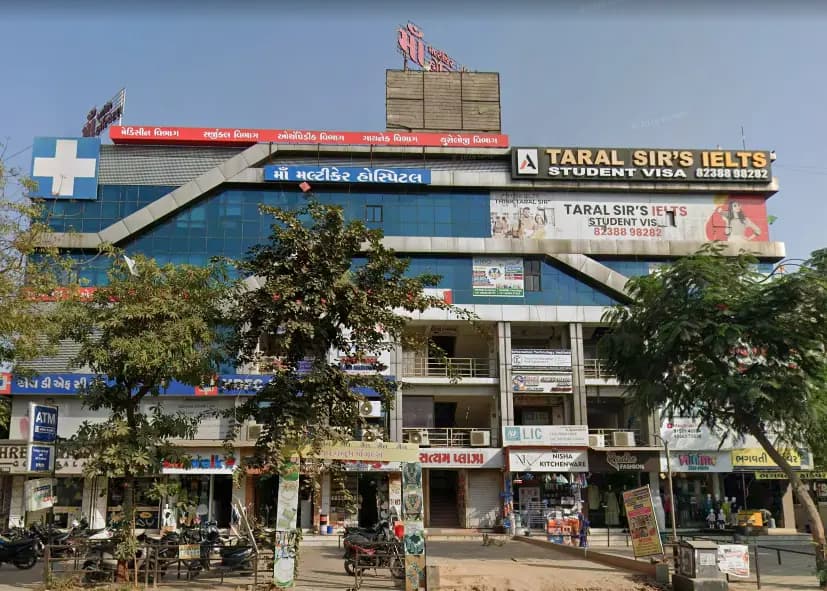
CEC Nikol is Near / opposite New DMart, Nikol (Satyam Plaza). Easy from Naroda, Vastral, Nikol. Visiting is optional — counseling by phone comes first.

From Satyam Plaza

S -25/26, D-mart, Satyam Plaza, Raspan Cross Rd, opp. Suketu Residency, near Nikol, Ankur Chokadi, New India Colony, Nikol, Ahmedabad, Gujarat 382350. Call +91 91049 37871 before you travel so we can confirm the day.

  • Mon – Sun: 9:00 AM – 8:00 PM
  • CEC Nikol building at Satyam Plaza near New DMart
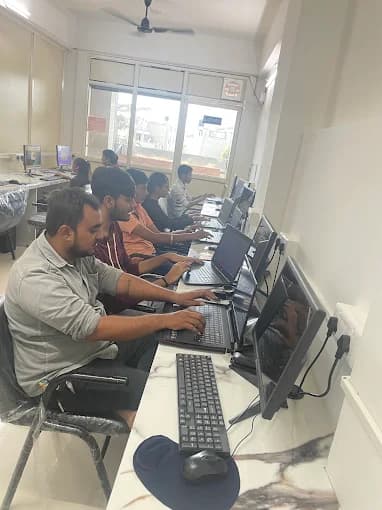
  • CEC Nikol computer lab

Faculty at this centre

Nishant Yadav teaches server administration and cyber security here. Counseling confirms this alert is the right start.

  • Nishant Yadav

    Hardware Networking · 3+ years

    Cyber Security, Server Administration

Our three centres in Ahmedabad

This server check is at Nikol. Maninagar and Vatva are available when counseling places you there. Visiting any centre is optional.

Questions before the first alert

If you can open a shared folder and have never written an alert, bring that to counseling.

  • How does one alert defend a lab server?

    The server is 10.10.20.10. The folder share is the service you meant to run. A status page is also answering. You write an alert for that status page only, prove the folder stays quiet, then turn the page off and deny it at the firewall. At Computer Education And Cybernetics (CEC), Nishant Yadav checks the alert and the page you stopped.

  • What is intrusion detection in plain words?

    It is a written notice: this lab PC opened the status page on this server. You name the source, the server, and the page. A notice that also fires when someone opens the folder is too wide, and you narrow it before you trust it.

  • When does that alert become a block?

    Intrusion prevention means the rule blocks as well as notices. You turn that block on only after the folder stays quiet and the status page alerts. A block that stops the folder is the wrong rule. The lasting block on this bench is the firewall deny, after the page is off.

  • What firewall rule do you write?

    Allow the folder share. Deny the status page. You test both. The folder opens. The status page does not. The rule sits at the edge so the page stays closed even if it is started again on the server.

  • Do I need a security job before I start?

    No. You need a server you can point at. College students, career changers, and people already working in IT use the same card. If the server itself is still new, counseling starts with bringing that server up. After 12th anyone can apply, from any stream.

  • Where is this kind of server defense heading?

    New servers often arrive with a status page already on, and alert text is often drafted before anyone compares it with normal work. A draft can treat the folder share as the intrusion. The check that stays is one alert for the status page, a quiet folder, and the page turned off.

  • How does CEC help me practise this server?

    Nishant Yadav teaches server administration and cyber security here. You write the alert, reject a draft that fires on the folder, and turn the status page off. About 80% of training time is practical. Guest rules and alert tools stay on our Ahmedabad network security page.

  • Can I start from college, a career change, or a current IT job?

    Yes. College students, career changers, and working professionals use the same alert card. If the server is not up yet, counseling can start you on the networking bench first. School learners of any grade start with counseling before a course.

  • How do I reach the Nikol lab?

    CEC Nikol is Near / opposite New DMart, Nikol (Satyam Plaza). Easy from Naroda, Vastral, Nikol. The centre is at S -25/26, D-mart, Satyam Plaza, Raspan Cross Rd, opp. Suketu Residency, near Nikol, Ankur Chokadi, New India Colony, Nikol, Ahmedabad, Gujarat 382350. Call +91 91049 37871 before you visit.

  • Can I start without visiting Nikol?

    Yes. Counseling is by call, WhatsApp, or email on +91 91049 37871 or info@cecyours.org. Visiting the lab is optional. If another Ahmedabad centre is easier, say so in counseling and we will place you where the same server check fits.

Write the alert, then turn the page off

Tell us whether you are in college, changing careers, or already working in IT. We will start you on the alert or on bringing the server up — and the check stays on gear we own.

Or reach us directly

+91 91049 37871 · info@cecyours.org