Networking Course in Nikol, Ahmedabad

Networking here means a rack you can point at: a switch port with a link light, a router used as the gateway, and a server that counts only when its folder opens. After 12th, in college, or changing careers, you practise that with us. At Computer Education And Cybernetics (CEC) Nishant Yadav checks the port before the note counts. The rack is at Satyam Plaza, opposite New DMart.

Or reach us directly

+91 91049 37871 · info@cecyours.org

One rack card for the server

  • Server10.10.20.10
  • Switch portThe one you labeled
  • Router10.10.20.1
  • Working meansThe folder opens
You check first
The link light
The server keeps
One fixed address
You leave with
The rack card
You start with
Counseling

How does a server join a switch and a router?

You seat the cable, you give the server an address on the same LAN as the PC, and you prove it by opening a folder. We put that switch and that server in front of you before the card is typed.

Hardware networking on this bench means a cable with a link light, a switch that keeps the server and a PC on one LAN, and a router address you type as the gateway. Server administration means the server keeps 10.10.20.10 and the folder service is running. A /28 has 16 addresses and 14 usable hosts. Computer Education And Cybernetics (CEC) teaches this on lab gear, with Nishant Yadav checking the card.

  • Hardware connectivity is the cable you can trace

    You follow one cable from the server to a switch port and you seat it until it clicks. The link light is the proof. A power light only means the server has electricity.

  • The switch keeps the server and the PC on one LAN

    Both use 10.10.20.0/28. A /28 is 16 addresses, 14 of them usable. You write the server as .10 before you type it. Traffic between them stays on the switch.

  • The router is the gateway, not a second network

    You type 10.10.20.1 as the gateway on the server. That is the router’s address on this LAN. Splitting a building into rooms of different sizes stays on the wider networking page.

  • Server administration is the service, not the ping

    A ping only proves the address answers. The lab is done when the folder on the server opens. If that service is stopped, the link light can be on and the folder still stays closed.

A task on paper first

For 10.10.20.0/28, write the network 10.10.20.0, the router 10.10.20.1, the server 10.10.20.10, and the broadcast 10.10.20.15. Across our centres we have conducted 20,000+ of training. This rack card is that page, done before the cable moves.
A worked example: the server was on, and the folder stayed closed

Power is not connectivity, and a ping is not a running service.

  1. The plan

    The rack card names the switch port, the server address 10.10.20.10, the router at 10.10.20.1, and the proof: the folder opens. You write those four lines before you touch a cable.

  2. What you look at

    The server’s power light is on. The switch port you labeled has no link light. The cable leaves the server and sits loose against the switch. It was never clicked in.

  3. The decision

    You seat the cable. The link light comes on, and a ping to 10.10.20.10 answers. The folder still does not open. The address is fine. The service that shares the folder is stopped.

  4. What you write

    Power was already good. The link was the first miss. The service was the second. You start that service on the lab server, the folder opens, and the card records both misses.

An honest limit: this bench is one server, one switch, and one router on a single LAN. Splitting a building into rooms, and the VLANs that keep those rooms apart, is the Ahmedabad networking page. Rules between networks come after, on the network security course.

Where do physical servers and their cables go next?

Two changes are already in ordinary server rooms. You still read the link, then the service. A drafted rack card can name a port the cable is not in, so the light stays your check.

  • The server often becomes a virtual machine

    The case disappears. A virtual machine with no virtual cable is the same dark port. You still attach it to a switch before you blame the folder.

  • The switch moves onto a screen

    You may set the port from a page instead of standing at the rack. The link state on that page is still the check. A green power icon is not a seated cable.

Server rooms are shifting as machines become virtual and as switch ports are set from a screen. The durable skill is telling a dark link from a stopped service. CEC trains that order on the rack.

How we teach you this rack

About 80% of our training is practical. Nishant Yadav reads the card the way a reviewer would: Is the cable in the port you named, and did the folder open?

  1. 1. Counseling before the first cable

    After 12th anyone can apply, from any stream. College students who want time on a switch and a server, and career changers moving into support work, start here too. School learners of any grade start with counseling before a course.

  2. 2. Nishant Yadav reads the rack card with you

    He teaches server administration here, and his role is hardware networking. He sends the card back when the port, the address, and the folder do not agree.

  3. 3. Four checks, in order

    Power, link, address, then the service. About 80% of training time is practical. This hour is those four checks on gear in the lab.

  4. 4. You leave with the miss written down

    The card names which check failed and what you changed. That note is what you can show later. A mentor does not accept “the server was on” as the whole story.

Computer Education And Cybernetics (CEC) teaches this rack as hardware networking and server administration: one cable, one gateway, and one folder. You start with counseling. We stay with you until you get a job, based on your performance. Larger subnet plans stay on the Ahmedabad networking page.

When the server answers on purpose, security work has a host you understand. That next step at this centre is the cyber security course at this centre.

Placement support and certificates

The rack card is the proof you can show. We help you put it in a portfolio, then we stay with you for the job search.

How we stay with you

  • We stay with you until you get a job, based on your performance in training, projects, and interviews
  • Our 5-step placement preparation covers your resume, the rack card, communication, and mock interviews
  • The rack card, with the link miss and the service miss written on it, is what you can show
  • Course completion certificates are issued after you finish the practical requirements. This is not a Cisco certificate

More detail on placement support at CEC.

What the cable, the gateway, and the folder each ask of you

These are three jobs on the same rack, not three courses. After 12th you can start from the link light. College students use the card when a diagram was not enough. Career changers use the folder to show they can explain a server that looked on.

  • The cable

    You trace it from the server to one switch port and you trust the link light. Hardware connectivity ends when that light is on, not when the power light is on.

  • The gateway

    You type the router’s address, 10.10.20.1, on the server. This bench stays on one LAN. The router is the way out, and you record it before you need it.

  • The service

    You start the share and you open the folder from the PC. Server administration here is that result. A ping without the folder is an unfinished card.

How you reach the Nikol lab

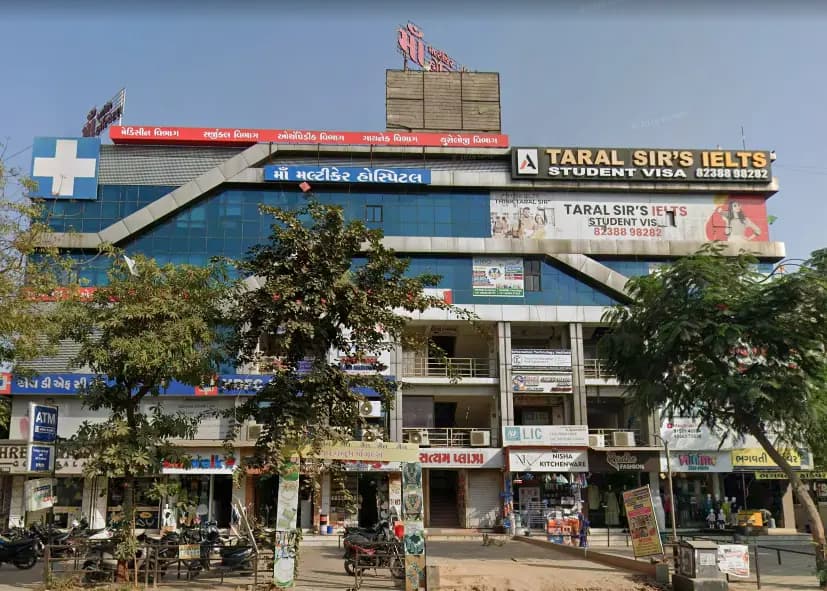
CEC Nikol is Near / opposite New DMart, Nikol (Satyam Plaza). Easy from Naroda, Vastral, Nikol. Visiting is optional — counseling by phone comes first.

From Satyam Plaza

S -25/26, D-mart, Satyam Plaza, Raspan Cross Rd, opp. Suketu Residency, near Nikol, Ankur Chokadi, New India Colony, Nikol, Ahmedabad, Gujarat 382350. Call +91 91049 37871 before you travel so we can confirm the day.

  • Mon – Sun: 9:00 AM – 8:00 PM
  • CEC Nikol building at Satyam Plaza near New DMart
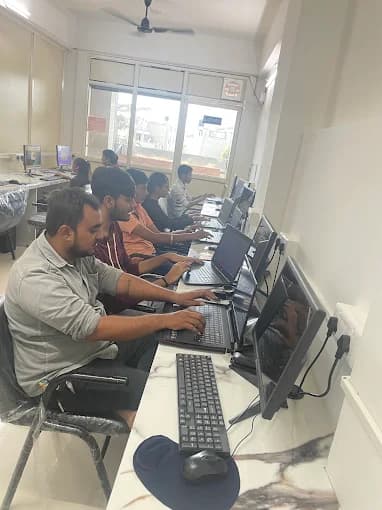
  • CEC Nikol computer lab

Faculty at this centre

Nishant Yadav teaches server administration here. Counseling confirms this rack is the right start.

  • Nishant Yadav

    Hardware Networking · 3+ years

    Cyber Security, Server Administration

Our three centres in Ahmedabad

This rack is at Nikol. Maninagar and Vatva are available when counseling places you there. Visiting any centre is optional.

Questions before you open the rack

If you can use a computer and have never seated a server cable, bring that to counseling.

  • How does a server join this rack?

    You seat one cable from the server into a switch port, give the server 10.10.20.10 on the 10.10.20.0/28 LAN, and type the router 10.10.20.1 as its gateway. The lab is finished when the folder opens from the PC, not when the power light is on. At Computer Education And Cybernetics (CEC), Nishant Yadav checks that card with you.

  • What is hardware connectivity in plain words?

    It is the cable you can trace and the link light that follows. If the connector is not clicked into the switch, the server can be powered on and still be absent from the LAN. You fix the seat before you change an address.

  • What do you configure on the switch and the router?

    On the switch you use the port you labeled for the server, on the same LAN as the PC. On the router you use 10.10.20.1 as the gateway for that LAN. You do not build a second network on this bench. Configuration means the port, the address, and a folder that opens.

  • What does server administration mean here?

    You give the server a fixed address and you start the service that shares the folder. A ping can succeed while that service is stopped. You record both. CEC issues a course completion certificate after the practical requirements. This is not a Cisco certificate.

  • Do I need server experience before I start?

    No. Counseling starts from the power light and the cable if those are new. After 12th anyone can apply, from any stream. College students and career changers use the same rack card. You do not need a prior networking job.

  • Where is this kind of server work heading?

    Many servers are now virtual machines, and many switches are set from a screen. A virtual machine with no virtual cable is still a dark port, and a drafted rack card can name a port the cable is not in. The check that stays is the link, then the service.

  • How does CEC help me practise this rack?

    Nishant Yadav teaches server administration here and works in hardware networking. You write the rack card, reseat a loose cable, and start the folder service when a ping is not enough. About 80% of training time is practical. The wider path for larger subnet plans is our Ahmedabad networking page.

  • Can I start after 12th, from college, or while changing careers?

    Yes. After 12th anyone can apply, from any stream. College students who want time on a switch and a server, and career changers moving into support work, use the same rack. School learners of any grade start with counseling before a course.

  • How do I reach the Nikol lab?

    CEC Nikol is Near / opposite New DMart, Nikol (Satyam Plaza). Easy from Naroda, Vastral, Nikol. The centre is at S -25/26, D-mart, Satyam Plaza, Raspan Cross Rd, opp. Suketu Residency, near Nikol, Ankur Chokadi, New India Colony, Nikol, Ahmedabad, Gujarat 382350. Call +91 91049 37871 before you visit.

  • Can I start without visiting Nikol?

    Yes. Counseling is by call, WhatsApp, or email on +91 91049 37871 or info@cecyours.org. Visiting the lab is optional. If another Ahmedabad centre is easier, say so in counseling and we will place you where a switch and a server fit.

Seat the cable, then open the folder

Tell us whether you are after 12th, in college, or changing careers. We will start you on the link light or on what a server address is — and the rack stays on gear we own.

Or reach us directly

+91 91049 37871 · info@cecyours.org