AI Development Using Python in Maninagar, Ahmedabad

Learn Python properly first, and AI development becomes code you can read, test and fix. You can start with no coding at all: we take you from your first line of Python to a script that calls an AI model, checks its answers and saves what it can trust — then to a small AI app you can explain in an interview. Counseling comes first, and visiting our centre is optional.

Or reach us directly

+91 75740 10176 · info@cecyours.org

From first line of Python to an AI app

  1. 1Python you can read

    marks = [72, 58, 91]
    print(sum(marks) / len(marks))

    Variables, lists, loops and functions — until you can predict what a line does before you run it

  2. 2Data in files

    for row in csv.DictReader(f):
        print(row["comment"])

    Read a CSV or JSON file, skip broken rows, and count what is actually there

  3. 3Calling a model

    data = json.loads(reply)
    if data.get("tag") in ALLOWED: ...

    Send text to an AI model through its API, ask for a fixed reply shape, and reject anything else

  4. 4A small AI app

    results.csv  +  check_by_hand.csv
    +  README with limits

    Wrap the script so someone else can run it, with logs and a note on where it fails

Coding needed to start
None
First project
A script that tags real comments
Suits
After 12th, graduates, switchers
First step
A counseling conversation

What is AI development using Python?

AI development using Python means writing Python programs that put an AI model to work on a real task and make the result reliable. The model does the language or prediction part; your Python does everything else — reading the data, sending it, checking the answer, and recording what failed.

AI development using Python is the practice of building programs that use AI models through code. A Python script reads and cleans input data, sends each item to a model through an API with a fixed instruction, receives a structured reply such as JSON, validates every field, retries or sets aside failures, and saves the trusted results with a log. At Computer Education And Cybernetics (CEC), learners first build Python foundations from zero, then practise this loop until they can ship and explain a small AI application.

Why Python? It reads almost like plain English, it handles files and text with very little code, and nearly every AI model provider offers Python examples first. That makes it the shortest honest route from “I have never coded” to “I built something with AI that works.”

How does a Python script turn into an AI feature?

A Python AI feature is a short loop that runs once per item: read, ask, check, save. The model sits in the middle of that loop, but most of the code — and most of the bugs — live around it.

  1. 1

    Read and clean the input

    Python opens the file, skips empty or duplicate rows, and keeps only the column the model needs. Bad input is the most common reason an AI feature gives bad output.

  2. 2

    Build the request

    Your code joins a fixed instruction (the prompt) with one row of text, and asks for the answer as JSON — a structured text format with named fields, such as tag and summary.

  3. 3

    Call the model through its API

    An API (application programming interface) is the doorway your program uses to send that request to a hosted model and get a reply back. Your code waits, then receives plain text.

  4. 4

    Validate before you trust

    Python tries to parse the reply as JSON and checks every field against the values you allow. If parsing fails or a value is off the list, the row is retried once and then set aside for a person.

  5. 5

    Save, log and report

    Good rows go to a results file, failed rows to a check-by-hand file, and a short log records how many of each. That log is how you prove the feature works — or show where it does not.

Your practice task

Take 30 product reviews in a CSV. Write a Python function that sends one review to a model and asks for JSON with “sentiment” and “reason”. Then break it on purpose: feed it an empty review, a review in two languages, and a reply with a missing field. Your job is to make the script survive all three without crashing. We sit with you through the first broken run, because reading that first traceback together is where the loop starts to make sense.

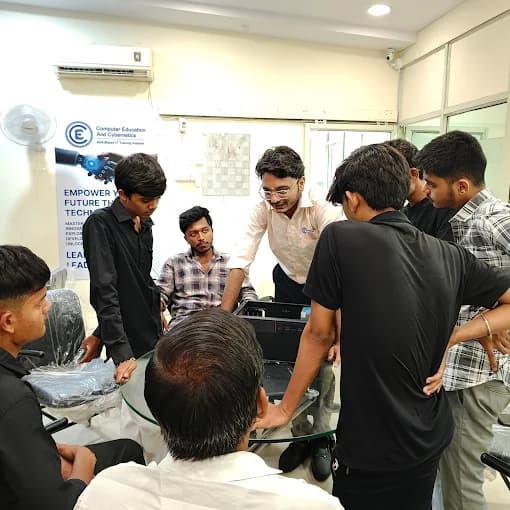
What you can do after this, honestly

You can build a script that runs an AI model over a real file, catches bad replies, and reports what it could not handle. Running the same feature for thousands of users, with monitoring, security review and cost control, takes more practice and usually grows on the job.

Worked example: tagging 160 feedback comments with Python and an AI model

This is the shape of an exercise we use in class. Practice files change between batches; the steps and the habit of writing down what failed do not.

The input

A tuition class exports 160 feedback comments from its online form into a CSV: the date, the batch, and a free-text comment. The owner wants each comment tagged as a topic doubt, a fees or timing question, or praise, so the right person replies first.

  1. 1

    What you look at

    You open the file in Python and count rows. 7 comments are empty, so 153 remain. Several are Gujarati typed in English letters, and a few mix two requests in one line.

  2. 2

    What the code does

    For each comment, your script sends the prompt plus the text to the model and asks for JSON with two fields: tag and a one-line summary. Every reply is parsed and checked against the three allowed tags.

  3. 3

    What goes wrong first

    The first run crashes on row 38 with a KeyError: the model wrote ‘Tag’ instead of ‘tag’. You add validation and one retry instead of patching that single row. On the second run, 146 replies pass and 7 go to check_by_hand.csv.

  4. 4

    The decision

    The owner reads the 31 fees or timing comments first, because those need a reply today. A person tags the 7 set-aside comments. Nobody treats the model's tags as final without a spot check.

  5. 5

    What you write down

    Rows removed and why, the prompt version that worked, the KeyError and its fix, and one limit: in a spot check of 20 mixed Gujarati-English comments, 4 were tagged wrong.

The check that fixed the crash

import csv, json

ALLOWED = {"topic doubt", "fees or timing", "praise"}

def tag_comment(text):
    reply = ask_model(PROMPT + text)  # our helper around the model's API
    try:
        data = json.loads(reply)
    except json.JSONDecodeError:
        return None
    if data.get("tag") not in ALLOWED:
        return None
    return data

Thirteen lines, and only one of them talks to the model. The rest decide what to trust. That ratio is normal in AI development, and it is why we teach Python before AI.

What do you learn, in what order?

Five stages, each building on the last. You move on when you can show the proof for a stage, not when a calendar says so — that is how a learner with zero coding reaches a working AI application without gaps.

  1. 1Python foundations

    What you practise

    Variables, lists, dictionaries, loops, functions and reading error messages. You write small programs — a marks calculator, a word counter — and explain each line aloud.

    What you show to move on

    A folder of small programs on GitHub, one commit per exercise

  2. 2Working with data

    What you practise

    Opening CSV and JSON files, cleaning messy rows, counting and grouping. You learn why the same question gives different answers on dirty and clean data.

    What you show to move on

    A cleaning script plus a note on every row you removed

  3. 3Machine learning fundamentals

    What you practise

    The idea of labelled data, training on most rows and testing on rows held back, and reading the score honestly. Enough to know when a trained model is the right tool and when calling a ready-made model is simpler.

    What you show to move on

    One small train-and-test exercise with its held-back score

  4. 4AI APIs and prompts

    What you practise

    Calling a hosted model from Python, asking for structured replies, versioning prompts, and handling timeouts, bad formats and cost. Prompt engineering here is part of the code, not a separate trick.

    What you show to move on

    A script with validation, retries and a prompt revision log

  5. 5AI application development

    What you practise

    Turning a script into something another person can run: clear inputs, logs, a README, and a simple interface where it helps.

    What you show to move on

    Your portfolio project — the piece you explain in interviews

The full module list and duration sit on the AI Development Using Python course page.

Where is Python AI development heading?

Three changes are already visible in this work. Each one moves effort away from typing code and towards checking it — which is why we practise reviewing and debugging with you from the first week, not only at the end.

  • AI assistants now draft much of the Python

    Code assistants write first versions of functions in seconds. The work moves to reading that draft, spotting the wrong library call or the missing edge case, and testing it. In our lab, any line you keep from an assistant is a line you must be able to explain.

  • Most AI features call hosted models instead of training from scratch

    Many applications now send requests to a ready-made model through an API and ask for structured output, often JSON. The skill shifts from building a model to briefing it precisely and validating what comes back — exactly what the worked example above practises.

  • Models can now call your Python functions

    Newer model APIs let a model ask your program to run a function — look up a record, do a calculation — and then use the result. That makes clean, well-named, tested functions more valuable, not less.

Where AI still fails in Python work

  • It writes confident code that calls functions or options that do not exist
  • Its reply format drifts — a field renamed, a quote missing — and breaks your parser
  • It misreads mixed-language text, such as Gujarati typed in English letters
  • It cannot tell you its own answer is wrong; only your check against evidence can

The skill that stays valuable either way

Reading Python and proving it works. Whether the code came from you, an assistant or a model calling your function, the person who can read a traceback, write a validation check and explain a limit is the one a team trusts. In practice we ask you to write the check before you run the code, then show that it catches the failure.

In Python AI development, the visible shift is from writing every line by hand to reviewing code drafted by AI assistants, calling hosted models through APIs for structured output, and letting models call tested Python functions. The lasting skill is reading, testing and debugging Python against evidence. Computer Education And Cybernetics (CEC) trains that skill first at its Maninagar, Nikol and Vatva centres in Ahmedabad.

How we take you from your first line of Python to an AI project

About 80% of our training is practical, so most of your hours are spent typing, breaking and fixing Python in the lab with a mentor nearby — not watching slides about AI.

  1. 1

    Counseling and a starting-point check

    We look at where you are — after 12th, a graduate, or switching from a non-IT job — and what you want to build. You leave with a roadmap: how long the Python foundation will take you and what comes after.

  2. 2

    Python from zero, in a small batch

    You type every program yourself in our lab. Mentors watch you work, so a doubt is cleared the moment it appears instead of piling up for a week.

  3. 3

    Debugging as a lesson, not a failure

    We hand you broken scripts on purpose. Reading a traceback, finding the line and fixing the cause is practised until it feels normal — that is the skill the worked example depends on.

  4. 4

    AI as a tutor, with rules

    You use AI assistants to explain errors and suggest fixes, then you must say why the fix works. Code you cannot explain does not go into your project.

  5. 5

    Progress you can see on GitHub

    Every exercise is committed. Your mentor reviews the history, not only the final file, and comments on naming, structure and the checks you added.

  6. 6

    One project you can explain end to end

    You finish with a small AI application, its README, its limits and its log — the centre of your portfolio, resume and mock interviews.

Mentor review here means line-level comments on your code: a variable name that hides meaning, a missing check on the model's reply, a function doing three jobs. You fix it, commit again, and the history shows how your code improved.

At Computer Education And Cybernetics (CEC), AI development using Python is taught in a fixed order: counseling and a starting-point check, Python foundations from zero in small batches, deliberate debugging practice, data handling, machine learning fundamentals, then calling AI models through APIs with validation. Every exercise is committed to GitHub for mentor review, and each learner finishes one small AI application with a README and documented limits for portfolio and interviews.

Placement support and certificates

Interviewers for Python and AI roles ask you to explain code you wrote. Your preparation is built around your own project, and we connect you with our network of 600+ hiring companies when your work is ready to show.

How we stay with you

  • We stay with you until you get a job, based on your performance in training, projects and interviews
  • Your Python project and its README become the centre of a role-focused resume and portfolio
  • Mock interviews ask you to walk through your own code — the bug you fixed, the check you added, the limit you found
  • Course completion certificates are issued after you finish the practical requirements

More detail on placement support at CEC.

Learners from this centre

  • Akash Bhavsar

    Data Science & AI with Python Course

    Data Scientist · Bacancy

  • Nitesh Singh

    Python Certification Course

    Associate Consultant · Capgemini

From our recorded outcomes at this centre. Your own result depends on your work.

Who is this path for, and what can you do after it?

This path suits anyone willing to practise step by step. Your stream, marks or job title do not decide fit; counseling looks at where you are starting and plans the Python foundation around it.

  • After 10th or 12th, any stream

    Pass, fail, a gap year, Science, Commerce or Arts — none of it decides fit. Your patience with step-by-step practice does. School learners of any grade start with counseling first.

  • Graduates and freshers

    If your degree gave you theory but no project, this path gives you code on GitHub and one AI application to discuss in interviews.

  • Non-IT career switchers

    Accounts, sales, teaching or operations — we start you at Python basics and use examples from the kind of work you already know.

What you can do after this course

  • Write and debug Python scripts that read, clean and summarise real files
  • Call an AI model from code, validate its replies and handle failures
  • Explain the train-and-test idea and read a model's score honestly
  • Ship one small AI application with a README and a list of its limits

What takes more time and work experience

  • Running AI features for thousands of users with monitoring and security reviews
  • Training large models or doing research-level machine learning
  • Designing a company's data systems — that grows with work experience

Programmes in our catalogue

Real programmes connected to this path. Counseling tells you which one matches your starting point.

Learning Python at our Maninagar centre

Our Maninagar lab is on the second floor of Gopal Tower, about 2 minutes from Maninagar Railway Station. If you live elsewhere, counseling and your first questions work the same way by call, WhatsApp or email.

Getting here

Maninagar Railway Station is the easiest reference point; the centre is on the station road. BRTS, AMTS buses also serve the area.

Open hours

  • Mon – Sat: 8:45 AM – 7:15 PM
  • Sun: 10:00 AM – 6:00 PM

Learners come from

  • Kankaria
  • Isanpur
  • Ghodasar
  • Khokhra
  • Meghaninagar
  • Danilimda
  • CEC Maninagar at Gopal Tower near Maninagar Railway Station
  • CEC Maninagar computer lab

Faculty you may learn with here

At this centre, machine learning, artificial intelligence and data science are taught alongside prompt engineering — the same pieces this path joins together in Python. Our faculty here are part of our 25+ full-time corporate trainers.

  • Shilpi Sharma

    Software Faculty · 2+ years

    Teaches: CCC, Tally Prime, Prompt Engineering

  • Tanvi Darji

    Software Faculty

    Teaches: MERN Stack Development, Data Science, Machine Learning, Artificial Intelligence

Our Ahmedabad centres

Maninagar is the centre for this page. Our Nikol and Vatva centres teach the same Python and AI path if either is easier to reach. Anyone, anywhere, can start with a call, WhatsApp or email.

Questions about learning AI development with Python

If yours is not here, ask it on a call — we would rather answer it before you start than after.

  • What is AI development using Python?

    It is writing Python programs that use AI models to do a useful job — tagging comments, summarising documents, answering questions over data. The Python part reads the data, sends it to the model, checks the reply and saves the result. The AI part is the model; the development part is everything around it that makes the result reliable.

  • How does Python code actually use an AI model?

    Your script sends a request to a hosted model through its API: a fixed instruction plus the text to work on, asking for the answer as JSON. The model replies with text, and your code parses it, checks each field against allowed values, retries once on failure, and sets aside anything that still fails for a person to check.

  • Can I learn this with no coding background at all?

    Yes. We start with Python basics — variables, lists, loops and functions — and you type every program yourself. AI topics begin only once you can read a short script and predict what it does. Most of the early effort is steady practice, not prior knowledge.

  • I studied Commerce or Arts, or did not clear 12th. Can I join?

    Yes. After 10th or 12th anyone can apply — pass, fail, droppers, any stream. Counseling checks your starting point and plans the Python foundation around it. Many learners from non-science backgrounds do well because they are careful readers.

  • Why learn Python if AI assistants can write code now?

    Because someone has to check what the assistant wrote. Assistants draft functions quickly, but they also invent options and miss edge cases, and newer models even call your own Python functions. Reading, testing and debugging Python is the skill that stays valuable as those tools change.

  • Do I need advanced maths for this course?

    No. Calling AI models and building applications around them needs logic and careful checking more than maths. The machine learning fundamentals part uses basic averages and percentages, which we explain as they come up.

  • How do you help me go from Python basics to an AI project?

    We begin with counseling and a starting-point check, then teach Python in small batches with mentors beside you. You practise debugging on purpose, use AI assistants only with an explanation, commit every exercise to GitHub for mentor review, and finish one small AI application with a README and its limits.

  • What will I have to show at the end?

    A GitHub history of your exercises, a data-cleaning script, a script that calls a model with validation and retries, and one small AI application with a README that lists what it does and where it fails. That set becomes your portfolio and the base of your mock interviews.

  • Will you help me find a job after this course?

    We stay with you until you get a job, based on your performance in training, projects and interviews. That includes a role-focused resume built around your Python project, mock interviews where you walk through your own code, and guidance on openings that match what you practised.

  • Where is CEC Maninagar, and do I have to visit?

    Computer Education And Cybernetics (CEC) Maninagar is at 2nd floor, Gopal Tower, Computer Education And Cybernetics, near Maninagar Railway Station Road, Maninagar, Ahmedabad, Gujarat 380008, about 2 minutes from Maninagar Railway Station. Visiting is optional — counseling works by call or WhatsApp on +91 75740 10176, or by email, including for learners outside Ahmedabad.

  • Who teaches AI and Python at CEC Maninagar?

    Our Maninagar faculty record lists Shilpi Sharma, Software Faculty (CCC, Tally Prime, Prompt Engineering); Tanvi Darji, Software Faculty (MERN Stack Development, Data Science, Machine Learning, Artificial Intelligence). They are part of our 25+ full-time corporate trainers across our three Ahmedabad centres.

Start with Python. Build with AI. Explain every line.

Tell us where you are starting from. We will plan your Python foundation, practise the AI loop with you, and stay with you until your project is ready to show — at our Maninagar centre, or by phone if visiting is not practical.

Or reach us directly

+91 75740 10176 · info@cecyours.org