Back to Blogs

Web Hosting and Domain – A Complete Guide

December 15, 2025
5 min read
Web Hosting and Domain – A Complete Guide

We wrote this so you can see how the topic works in practice. You can read it from anywhere. If you want lab practice next, we will help you pick a course in counselling.

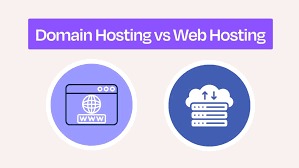
Web hosting and domain names are essential components of any website. A domain is your website’s address, while hosting stores your website files on a server. Choosing the right hosting ensures performance, security, and scalability.

What is a Domain?

What is a Domain?

A domain is the unique address users type to access your website.

Types of Hosting

Types of Hosting

Shared, VPS, cloud, and dedicated hosting options are available.

Who this is for

This is for students, job seekers, and working learners who want a clearer picture of the skill before they pick a course.

How we help you after you read

We help you see a career direction before you pick a course. You can start from where you are, including if you are new to IT. In lab we practise the role, not only names of tools. After a course, we stay with you until you get a job, based on your performance.

Share this article

What you can do next

If this topic is the skill you want to practise, we can map it to a course. You can book counselling or open a course. A branch visit is not required outside Ahmedabad.

Questions about this article

Short answers about who this is for, what to do next, and how to talk to us.

  • Who should read Web Hosting and Domain – A Complete Guide?

    This is for students, job seekers, and working learners who want a clearer picture of the skill before they pick a course. You can read it from anywhere. If you want lab practice next, we will help you pick a course.

  • Do I need to visit Ahmedabad to use this article?

    No. You can read from anywhere. Our centres are in Ahmedabad only — Maninagar, Nikol, and Vatva. A visit is optional and is not required outside Ahmedabad.

  • Is this article the same as joining a CEC course?

    No. We wrote this so you can understand the topic in plain language. A course is where you practise in lab, build work, and get feedback.

  • What should I do after I finish reading?

    If this is the skill you want to practise, book counselling or open a related course. For this topic, you can start with Cyber Security & Ethical Hacking with AI, HTML5, Full Stack MERNN Developer with AI, or browse all courses.

  • Can a parent use this to decide for a child?

    Yes. You can read it together and then book counselling. School children of any grade start with counselling first — we do not enrol a child into a full career track without that conversation.

  • Can I start this skill after 10th or 12th if I did not pass?

    After 10th or 12th, anyone can apply — pass, not pass, or a gap year, and any stream. Counselling is where we match the skill in this article to a course you can actually attend.

  • Will reading this get me a job?

    No. An article is for understanding. If you join a course, complete practical work, and sit interviews, we stay with you until you get a job, based on your performance.

  • How do I talk to CEC about this topic?

    Book counselling and mention this article, call +91 75740 10176, WhatsApp the same number, or email info@cecyours.org. You do not need to visit a branch to start.

More to Explore

Complete Guide to Web Development for Beginners
Dec 15, 2025

Complete Guide to Web Development for Beginners

Web Development: A Complete Beginner’s Guide

In today’s digital-first world, websites and web applications have become essential for businesses, organizations, and individuals. From simple informational websites to complex web-based platforms, web development plays a crucial role in building a strong online presence. This guide by Computer Education And Cybernetics is designed to help beginners understand what web development is, how it works, the skills required, and the career opportunities it offers.

What is Web Development?

Web development is the process of creating websites and web applications that run on the internet. It involves planning, designing, building, testing, and maintaining web-based systems that users can access through a browser.

Web development covers multiple aspects, including:

  • Designing user interfaces

  • Writing business logic

  • Managing databases

  • Ensuring performance and security

  • Deploying and maintaining applications

In simple terms, web development turns ideas into functional digital experiences.

Why Web Development is Important Today

Almost every business today relies on the internet to reach customers, offer services, and build trust. Websites and web applications help businesses:

  • Establish an online identity

  • Reach global audiences

  • Automate processes

  • Improve customer engagement

  • Increase sales and visibility

Because of this growing reliance on digital platforms, web development has become one of the most in-demand skills globally.

Core Technologies for Beginners

HTML – Structure

HTML (HyperText Markup Language) is the foundation of web development. It defines the structure and content of web pages, such as headings, paragraphs, images, and links.

CSS – Styling

CSS (Cascading Style Sheets) is used to style and design web pages. It controls layout, colors, fonts, animations, and responsiveness.

JavaScript – Interactivity

JavaScript adds interactivity and dynamic behavior to websites. It allows pages to respond to user actions like clicks, form submissions, and real-time updates.

Together, HTML, CSS, and JavaScript form the core of frontend development.

Advanced Web Development Concepts

As beginners progress, they move beyond basic technologies and learn advanced concepts such as:

Frontend Frameworks & Libraries

  • React.js

  • Angular

  • Vue.js

These tools help build scalable, fast, and maintainable user interfaces.

Backend Technologies

  • Node.js

  • Python (Django, Flask, FastAPI)

  • Java

  • PHP

Backend frameworks simplify server-side development and API creation.

Databases

  • MySQL

  • PostgreSQL

  • MongoDB

Databases store and manage application data securely.

APIs and Integration

APIs allow different systems to communicate. They enable features like payment gateways, third-party services, and mobile app integration.

Deployment and Hosting

Deployment involves making applications live on the internet using platforms such as:

  • Cloud hosting

  • VPS

  • CI/CD pipelines

Tools Used in Web Development

Web developers rely on various tools to improve productivity and efficiency:

  • Code editors (VS Code)

  • Version control (Git, GitHub)

  • Browser developer tools

  • Package managers

  • Build and testing tools

Web Development Roadmap for Beginners

A structured learning path helps beginners progress effectively:

  1. Learn HTML, CSS, and JavaScript

  2. Understand responsive design

  3. Learn a frontend framework

  4. Study backend development

  5. Work with databases

  6. Build real-world projects

  7. Learn deployment and security

Consistency and hands-on practice are key to mastering web development.

Career Opportunities in Web Development

Web development offers diverse career paths, including:

  • Frontend Developer

  • Backend Developer

  • Full-Stack Developer

  • Web Designer

  • Software Engineer

With businesses continuously expanding online, skilled web developers are in high demand worldwide.

Why Choose Web Development as a Career?

Web development is attractive because it offers:

  • High demand and job security

  • Global career opportunities

  • Freelancing and remote work options

  • Continuous learning and growth

  • Competitive salaries

It is suitable for beginners, career switchers, and professionals alike.

Read Article
Database Management Systems – A Complete Overview
Dec 13, 2025

Database Management Systems – A Complete Overview

Database Management Systems – A Complete Overview

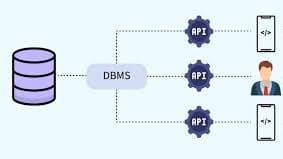
In modern applications, data is the most valuable asset. A Database Management System (DBMS) is software that stores, organizes, and manages data efficiently, enabling applications to retrieve, update, and secure information reliably. Understanding DBMS is essential for developers, data analysts, and IT professionals.

What Is a Database Management System (DBMS)?

A DBMS is a software system that allows users to:

  • Store large amounts of structured or unstructured data

  • Retrieve information quickly and accurately

  • Update data while maintaining consistency

  • Secure data from unauthorized access

  • Manage concurrent access by multiple users

Example: MySQL, PostgreSQL, Oracle, MongoDB

Key Components of a DBMS

  1. Database Engine

    • Handles data storage, retrieval, and management

    • Ensures fast queries and reliable performance

  2. Database Schema

    • Defines the structure of data (tables, columns, relationships)

  3. Query Processor

    • Interprets and executes user queries (SQL / NoSQL queries)

  4. Transaction Management

    • Ensures ACID properties: Atomicity, Consistency, Isolation, Durability

  5. Security Management

    • Controls user access and permissions

    • Protects data from unauthorized users

Types of Database Management Systems

1. Relational DBMS (RDBMS)

  • Uses tables with rows and columns

  • Supports SQL for querying data

  • Ideal for structured data and transactional applications

Examples: MySQL, PostgreSQL, Oracle

2. NoSQL DBMS

  • Stores data in flexible formats (documents, key-value, graph, column)

  • Suitable for unstructured or large-scale data

  • High performance and scalability

Examples: MongoDB, Firebase, Cassandra

3. Hierarchical DBMS

  • Data is organized in a tree structure

  • Each record has a parent-child relationship

Example: IBM IMS

4. Network DBMS

  • Data is represented as a graph with nodes and connections

  • Allows multiple parent-child relationships

Example: IDMS

Advantages of Using a DBMS

  • Efficient data storage and retrieval

  • Reduces data redundancy

  • Ensures data integrity and consistency

  • Supports multi-user access

  • Provides security and backup solutions

Real-World Applications of DBMS

  • E-Commerce Platforms: Storing user accounts, products, and transactions

  • Banking Systems: Managing accounts, transactions, and loans

  • Healthcare: Patient records, appointments, and prescriptions

  • Education: Student data, courses, and results

  • Social Media: User profiles, posts, and messaging

Choosing the Right DBMS

  • For structured, transactional data → SQL/RDBMS

  • For large-scale, flexible data → NoSQL

  • For complex relationships → Hierarchical or Network DBMS

Read Article
Introduction to Computer Networks for Beginners
Dec 15, 2025

Introduction to Computer Networks for Beginners

Introduction to Computer Networks for Beginners

In today’s digital world, communication is at the heart of every technology. From sending a simple WhatsApp message to streaming high-definition videos or accessing cloud-based applications, everything depends on computer networks. Understanding computer networks is no longer optional—it is a foundational skill for students, IT professionals, developers, and businesses alike.

At Computer Education And Cybernetics, we believe in simplifying complex technical concepts and making them accessible to everyone. This beginner-friendly guide introduces computer networks from the ground up, helping you understand how devices connect, communicate, and share data efficiently.

What is a Computer Network?

A computer network is a collection of two or more computing devices connected together to share data, resources, and services. These devices can include computers, servers, smartphones, routers, switches, and IoT devices.

The connection between devices can be established using wired media (such as Ethernet cables and fiber optics) or wireless media (such as Wi-Fi, Bluetooth, and cellular networks).

In simple terms, whenever two devices exchange information, they form a network.

Why Are Computer Networks Important?

Computer networks play a vital role in both personal and professional environments. They enable fast communication, efficient data sharing, and centralized management of resources.

Key Benefits of Computer Networks

  • Faster communication between users

  • Resource sharing (printers, files, internet connection)

  • Centralized data storage and management

  • Cost efficiency for businesses

  • Scalability and flexibility

  • Improved collaboration and productivity

  • Secure access to data and services

Without networks, modern technologies such as cloud computing, online education, digital banking, and e-commerce would not exist.

Basic Components of a Computer Network

To understand how networks work, it is important to know their core components.

1. Nodes (Devices)

Nodes are the devices connected to a network. Examples include:

  • Computers and laptops

  • Mobile phones and tablets

  • Servers

  • Printers

  • IoT devices

Each node can send, receive, or forward data.

2. Transmission Media

Transmission media refers to the path through which data travels.

Wired Media

  • Ethernet cables

  • Coaxial cables

  • Fiber optic cables

Wireless Media

  • Wi-Fi

  • Bluetooth

  • Infrared

  • Cellular networks (4G, 5G)

3. Networking Devices

These devices help manage and control data flow in a network.

  • Router – Connects multiple networks and routes data

  • Switch – Connects devices within the same network

  • Hub – Basic device that broadcasts data to all nodes

  • Modem – Connects a local network to the internet

  • Access Point – Provides wireless connectivity

4. Network Protocols

Protocols are rules that define how data is transmitted and received.

Common protocols include:

  • TCP/IP

  • HTTP / HTTPS

  • FTP

  • SMTP

  • DNS

Without protocols, devices would not understand each other.

Network Topologies

Network topology defines how devices are arranged and connected.

Common Topologies

  • Bus Topology

  • Star Topology

  • Ring Topology

  • Mesh Topology

  • Hybrid Topology

Each topology has its own advantages and use cases depending on cost, performance, and reliability.

How Data Travels in a Network

When you send data over a network:

  1. Data is divided into small packets

  2. Each packet contains sender and receiver information

  3. Packets travel through different paths

  4. Receiver reassembles packets into original data

This process ensures efficient and reliable communication even if some paths fail.

Introduction to the Internet

The Internet is a global network of interconnected computer networks. It allows billions of devices worldwide to communicate using standard protocols like TCP/IP.

Internet Services Include:

  • Email

  • Web browsing

  • Cloud computing

  • Online streaming

  • Social media

  • E-commerce

The internet is a perfect example of how powerful computer networks can be.

Network Security Basics

With connectivity comes responsibility. Network security protects data and systems from unauthorized access.

Common Security Measures

  • Firewalls

  • Antivirus software

  • Encryption

  • Secure passwords

  • Authentication and authorization

At Computer Education And Cybernetics, we emphasize the importance of secure networking practices to protect digital assets.

Career Opportunities in Computer Networking

Learning computer networks opens doors to various career paths:

  • Network Engineer

  • System Administrator

  • Cybersecurity Analyst

  • Cloud Engineer

  • IT Support Specialist

  • DevOps Engineer

Networking knowledge is a foundation for advanced fields like cloud computing, cybersecurity, and artificial intelligence infrastructure.

Why Learn Computer Networks with Computer Education And Cybernetics?

Computer Education And Cybernetics focuses on delivering:

  • Industry-oriented learning

  • Beginner-friendly explanations

  • Practical knowledge

  • Modern technology insights

  • Career-focused guidance

Read Article