AI Course in Nikol, Ahmedabad

The most practical first step into AI is learning to instruct an AI assistant well — and to catch it when it is wrong. Here you will see how a language model turns your prompt into an answer, and how to structure, test and check prompts on the study and office tasks you already do. We practise it with you, then help you choose where to go next. Our centre is opposite New DMart at Satyam Plaza. Counseling comes first, at the centre — we warmly welcome you and your parents to visit before admission.

Or reach us directly

+91 91049 37871 · info@cecyours.org

From your prompt to an answer you can trust

  1. 1

    Your prompt

    Task, reader, the material to use, rules, and the shape of the answer

  2. 2

    Split into tokens

    The text becomes small pieces — words and parts of words

  3. 3

    Next-word prediction

    The model picks a likely next token, again and again, from patterns it learnt

  4. 4

    You verify

    Every name, number and date is checked against your source

Coding to begin
None needed
First practice
A real study or office task
You keep
Tested prompts + check notes
Then
Your wider AI path

How does an AI assistant turn your prompt into an answer?

An AI assistant such as a chatbot runs on a large language model: a program trained on huge amounts of text to predict what words usually come next. It does not search its memory for the right answer. It writes the most likely-sounding continuation of everything you gave it — which is why the way you write the prompt changes the answer so much.

Prompt engineering is the practice of writing, testing and checking instructions for an AI language model. The model splits a prompt into tokens, reads everything in its context window, and predicts a likely next token repeatedly until the answer is complete — producing plausible text, not verified facts. A learner who can structure a prompt (task, reader, material, rules, answer shape), test it across several runs, and verify the output against a source can use AI reliably on everyday study and office work. Computer Education And Cybernetics (CEC) teaches this as a first practical step into AI.

  1. Step 1

    Your words become tokens

    A token is a small piece of text — a short word, or part of a longer one. The model never reads your sentence the way you do; it reads a sequence of tokens.

  2. Step 2

    Everything in the context window counts

    The context window is all the text the model can see at once: your prompt, anything you paste, and the earlier chat. If a rule or fact is not in that window, the model does not know it.

  3. Step 3

    It predicts, one token at a time

    From patterns learnt during training, the model chooses a likely next token, adds it, and repeats until the answer is complete. It is predicting plausible text, not looking up the truth.

  4. Step 4

    The same prompt can give different answers

    Most assistants add a little randomness when picking tokens, so two runs can differ. That is why one good-looking answer proves very little — you test a prompt more than once.

Your first practice task

Pick one task you do every week — class notes into revision questions, or a daily sales sheet into a one-line summary. Write a prompt for it, run it three times, and mark each answer on four checks:

  • Did it follow the format you asked for?
  • Did it use only the facts you gave it?
  • Did it say what was missing instead of guessing?
  • Is the tone right for the person who will read it?

We sit beside you for the first round, because the moment you see two runs disagree on the same task, the idea of prediction stops being theory.

What you can do after this, honestly

You can write, test and check prompts for routine study and office work, keep a record of what you changed and why, and explain to someone non-technical why an AI answer cannot be trusted blindly. Building AI applications, training models, or automating whole processes needs Python and more practice — that is the wider AI path this step leads into.

A worked example: turning a leave policy into a five-line staff notice

This is the shape of an everyday exercise we use. The documents change between batches; the method of looking, deciding, testing and writing it down does not.

  1. 1

    The input

    A three-page office leave policy. The task: a five-line WhatsApp notice so staff know how to apply for leave.

  2. 2

    First prompt and what you look at

    You type “Summarise this policy for staff.” The reply is eleven friendly lines and says requests need seven days’ notice. You check the policy: it says three working days. The model filled in a typical number because nothing stopped it.

  3. 3

    The decision

    You rebuild the prompt in parts — task, reader, the policy pasted between clear markers, and rules: use only the text between the markers, write “not stated” if a detail is missing, maximum five lines, plain English. You also give the answer shape: who can apply, how, notice period, who approves, whom to ask.

  4. 4

    The test

    You run the new prompt three times, then once more on a copy of the policy with the notice-period line deleted. All three runs stay within five lines and say three working days. The edge-case run writes “Notice period: not stated” instead of inventing one.

  5. 5

    What you write down

    Both prompt versions, the invented “seven days” error, the rule that fixed it, the test results, and one line: a person still reads the notice against the policy before it is sent.

The skill here is not the wording of the final prompt. It is noticing the invented number, adding the rule that stops it, and proving the fix with a test — the same habit an employer looks for whatever AI tool they use.

How do you structure, test and verify a prompt?

A reliable prompt has clear parts, survives repeated and awkward runs, and is followed by a check against the source. Each of the three is a separate habit, and we practise them separately before putting them together.

Structure: the parts of a prompt

Task
Write a five-line staff notice
Reader
Office staff reading on a phone
Material
The policy text, between markers
Rules
Only use the material; say “not stated” if missing
Answer shape
One line each: who, how, notice, approval, contact
Example (optional)
One sample line in the tone you want

Test: prove it is not luck

  • Run it more than once

    Because answers vary, three runs show whether the prompt is reliable or just lucky once.

  • Try an awkward case

    Remove a detail, add a confusing one, or paste a longer document. A good prompt fails safely — it flags the gap.

  • Change one thing at a time

    If you rewrite everything at once, you never learn which change fixed the problem.

Verify: check before you use it

  • Check every name, number, date and amount against the source document
  • Ask the assistant to list any assumptions it made, then read that list
  • Mark anything it could not have known from what you gave it
  • Never paste passwords, salary slips, customer phone numbers or private records

Where are AI assistants heading, and where do they still fail?

Four changes are already visible in how people use AI assistants at work and in study. Each one makes a clear brief and a careful check more valuable, not less — so we have you re-run a saved prompt on a longer document during practice and find what broke.

  • Much longer inputs, including files

    Assistants now accept whole PDFs, spreadsheets and images in one go. You can ask about a full report — but a mistake buried in a long answer is harder to catch.

  • AI inside the tools you already use

    Email, documents, spreadsheets and chat apps increasingly have an assistant built in. Prompting is becoming an everyday office skill, not a separate website you visit.

  • Assistants that search and take actions

    Some assistants can now search the web, run calculations, or fill in and send things for you. When an assistant can act, an unclear instruction does more than write a wrong sentence.

  • Model updates change behaviour

    Providers update and retire models regularly, and the same prompt can answer differently afterwards. Saved prompts with their test notes let you re-check quickly instead of starting over.

Where assistants still fail

  • It invents facts, sources and numbers, and states them confidently
  • Totals and calculations across long tables often go wrong
  • It does not know your office rule, the latest circular, or anything nobody told it
  • Its general knowledge stops at a training date unless it is given a current source
  • It follows a vague instruction literally, including the vague part

The skill that stays valuable either way

Describing a task precisely enough that the result can be checked, and then actually checking it. Whether the assistant sits in a browser, inside your email, or takes actions on its own, someone has to say exactly what is wanted and confirm the facts. That person is useful in any office, and it is the habit every deeper AI direction builds on.

AI assistants are moving from short chat answers to reading whole files, working inside everyday office tools, searching and taking actions, and changing behaviour with each model update. They still invent facts, miscalculate across long tables, and miss anything they were not told. The lasting skill is a precise brief plus verification against a source, which Computer Education And Cybernetics trains as the first step of its AI learning at its Maninagar, Nikol and Vatva centres in Ahmedabad.

How we take you from your first prompt toward the wider AI path

About 80% of our training is practical, so you spend most of your time writing, running and checking prompts — not listening to talks about AI. Here is the order we follow with you.

  1. 1

    Counseling before anything else

    We ask what you studied, what tasks you do at college or work, and how many hours you can give each week. School learners of any grade start with counseling first. After 10th or 12th, anyone can apply — pass, fail, a gap year, any stream.

  2. 2

    Computer confidence, if you need it

    If files, folders, typing or copying text between apps still feel slow, we start there. Prompting goes faster when the computer itself is not the obstacle.

  3. 3

    Prompting on your own kind of work

    You practise on sample versions of tasks you really do — class notes into revision questions, a long circular into a short notice, a messy sales sheet into a summary line. You structure, test and verify each one.

  4. 4

    Mentor review of your prompt log

    Your mentor reads your versions and check notes, not only the final answer, and asks why you changed each line. When an answer fooled you, we go back to the exact spot and you correct it yourself.

  5. 5

    Explaining it in plain words

    You describe what your prompt does, how you tested it, and where it can still go wrong — the way you would to a manager or a teacher. That habit carries straight into interviews.

  6. 6

    Choosing your next step together

    Once prompting feels steady, counseling helps you decide whether to go deeper into generative AI, start Python and AI development, or move toward automation — based on what you enjoyed practising.

What your first prompting task usually looks like

  • Just finished 12th, any stream

    Turning a chapter of notes into practice questions, then checking every answer against the textbook.

  • In college, IT or non-IT

    Summarising a long assignment brief into a checklist, with anything unclear flagged instead of guessed.

  • Planning a career switch

    Using your current job as material — a report you write every week, rebuilt as a tested prompt.

  • Working and short on time

    Drafting routine emails and meeting notes, with a rule that every date and figure comes from your own notes.

What you leave with

A prompt notebook: tested prompts for tasks you really do, each with its versions, test results, and the one way it can still go wrong. It shows an employer that you use AI carefully — and it is the starting point when you move into generative AI, Python, or automation.

At Computer Education And Cybernetics (CEC), beginners start AI with counseling, then practise prompting on sample versions of their own study or office tasks: structuring each prompt, testing it across repeated and awkward runs, and verifying the output against the source. A mentor reviews every prompt version and check note. Learners finish with a prompt notebook and a counseling-led choice of next step — generative AI, Python and AI development, machine learning, or automation.

Placement support and certificates

Careful AI use helps in office, marketing, support and development roles alike, so we treat your prompting work as part of your evidence for whichever role you are aiming at.

How we stay with you

  • We stay with you until you get a job, based on your performance in training, projects, and interviews
  • Our 5-step placement preparation covers your resume, portfolio, communication and mock interviews
  • Your prompt notebook becomes evidence: real tasks, versions, test results and known limits you can walk an interviewer through
  • Course completion certificates are issued after you finish the practical requirements

More detail on placement support at CEC.

After prompting, where does the wider AI path go?

Prompting is the doorway, not the whole house. Each deeper direction reuses something you already practised here — which is why learners who start with prompting rarely feel they are starting from zero again.

  • Deeper generative AI

    What carries over from prompting

    Your structured prompts and review habits become longer drafts, small tools and a project.

    Generative AI course in Ahmedabad
  • Python and AI development

    What carries over from prompting

    The “answer shape” rule becomes code that asks a model for a fixed format and checks every reply.

    AI developer course in Ahmedabad
  • Machine learning and data

    What carries over from prompting

    Checking output against evidence becomes testing a model on data it has never seen.

    Machine learning course in Ahmedabad
  • AI automation

    What carries over from prompting

    Knowing where AI fails becomes deciding where a person must approve before a flow acts.

    AI automation course in Ahmedabad

These directions sit inside our artificial intelligence course in Ahmedabad. Counseling decides which one fits you and where you practise it.

Programmes in our catalogue

Real courses you can ask about. Counseling tells you which one matches your starting point.

Finding CEC Nikol, opposite New DMart

Our centre is at Satyam Plaza on Raspan Cross Road near Ankur Chokadi, opposite New DMart. For classroom admission, we warmly invite you and your parents to visit, meet the mentors and see the lab before you decide. Learning from outside Ahmedabad? Counseling happens on a call, and admission is completed online.

Getting here

Easy from Naroda, Vastral, Nikol. Look for the New DMart building — Satyam Plaza and our centre are opposite Suketu Residency.

Open hours

  • Mon – Sun: 9:00 AM – 8:00 PM

Learners come from

  • Nikol
  • Naroda
  • Vastral
  • CEC Nikol building at Satyam Plaza near New DMart
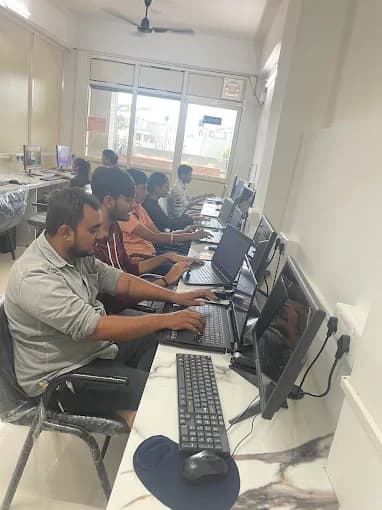
  • CEC Nikol computer lab

Who teaches prompting at this centre

Prompt engineering at our Nikol centre sits with faculty who also teach everyday office software, so practice stays close to real desk work. They are part of our 25+ full-time corporate trainers across our three centres.

  • Shivani Sharma

    Software Faculty · 4+ years

    Teaches: CCC, Tally Prime, Prompt Engineering, Graphic Design

For machine learning or AI development, counseling plans your practice through our city-wide AI course.

I loved the Digital Marketing with AI Tools course. Using AI for content and ads saved so much time and improved results.
Pooja Verma · Digital Marketing Executive, Digital Creations

A learner from our Nikol centre on using AI tools in her course. Your own result depends on your work.

Our Ahmedabad centres

Nikol is the centre for this page. Maninagar and Vatva are there if either is easier to reach. Whichever centre you choose, admission starts with a short visit — parents are always welcome; call, WhatsApp, or email us to book a time. Outside Ahmedabad? We offer online admission with a counseling call.

Questions about starting AI with prompting

If yours is not here, ask it on a call — we would rather answer it before you start than halfway through.

  • Is prompt engineering a good first step into AI?

    Yes, for most beginners. Prompt engineering means writing clear instructions for an AI assistant, testing them, and checking the answers. It needs no coding, gives useful results on everyday tasks within days, and builds the habit every later AI direction depends on: describing a task precisely and verifying the result.

  • How does an AI assistant turn my prompt into an answer?

    The assistant splits your text into tokens — small pieces of words — and reads everything in its context window: your prompt, pasted material, and earlier chat. It then predicts a likely next token, adds it, and repeats until the answer is done. It is producing plausible text from learnt patterns, not looking facts up, which is why answers must be checked.

  • How do I know if an AI answer is correct?

    Check every name, number, date and amount against your source document, and ask the assistant to list the assumptions it made. Run the prompt more than once and on an awkward case, such as a document with a detail removed. A good prompt makes the assistant say “not stated” rather than guess.

  • Do I need coding or an IT background to start?

    No. You need basic computer use and careful reading, and we teach computer confidence first if you need it. After 10th or 12th anyone can apply, from any stream; school learners of any grade start with counseling first.

  • Where are AI assistants heading, and will prompting still matter?

    Assistants now read whole files, sit inside email and office tools, and can search or take actions, and models are updated often. The tricks change, but writing a precise brief and checking the output against a source matter more as assistants do more on their own.

  • How do you help me move from prompting to the wider AI path?

    We start with counseling, practise prompting on sample versions of your real tasks, and a mentor reviews your prompt versions and check notes at each step. Once you are steady, counseling helps you choose the next step — deeper generative AI, Python and AI development, machine learning, or automation — based on what you practised.

  • Can I learn machine learning or AI development at CEC Nikol?

    Our Nikol faculty record lists prompt engineering, so this centre is where we start you on prompting and AI-assisted everyday work. For machine learning or AI development, counseling plans the right programme through our city-wide artificial intelligence course; ask about it on the same call.

  • Is it safe to paste office or college documents into an AI tool?

    Only if they contain nothing private. Never paste passwords, salary slips, customer phone numbers, ID numbers or confidential records. We practise on sample or anonymised versions of real tasks, and treat this rule as part of the skill.

  • Will you help me find a job after this?

    We stay with you until you get a job, based on your performance in training, projects, and interviews. Prompting on its own is rarely a job title, so we build it into your wider evidence: a resume, a portfolio with your prompt notebook, and mock interviews where you explain your own work.

  • Where is CEC Nikol, and do I need to visit before admission?

    Computer Education And Cybernetics (CEC) Nikol is at S -25/26, D-mart, Satyam Plaza, Raspan Cross Rd, opp. Suketu Residency, near Nikol, Ankur Chokadi, New India Colony, Nikol, Ahmedabad, Gujarat 382350, opposite New DMart. For classroom admission, yes — and we would be glad to welcome you. Come with your parents, meet our mentors and staff, see the lab and how classes run, and ask your questions face to face before you decide. Call or WhatsApp +91 91049 37871 to book a convenient time. If Maninagar or Vatva is closer, we will welcome you there instead. Learning from outside Ahmedabad? We offer online admission with a counseling call, so no travel is needed.

Start AI with one prompt you can trust

Tell us what you study or the work you do. We will help you practise writing, testing and checking prompts on tasks like yours, then plan your next AI step. We would be glad to welcome you and your parents at our Nikol centre. If you are outside Ahmedabad, we guide you on a counseling call and complete your admission online.

Or reach us directly

+91 91049 37871 · info@cecyours.org